.svg%20(1).png)


Key Takeways
- WhatsApp verification codes fail to appear for 8 common reasons: wrong phone number, no network signal, VoIP/virtual number rejected by WhatsApp, blocked SMS from unknown senders, DND mode enabled, WhatsApp account temporarily banned or restricted, carrier filtering the WhatsApp SMS verification, or the OTP already expired. Most resolve with a resend after 60seconds.
- If SMS delivery fails, WhatsApp offers voice call verification as a fallback — tap "Call me" instead of "Resend SMS" on the verification screen. Voice reaches your phone even when SMS is blocked or delayed.
- WhatsApp verification codes go to your MOBILE phone number, not to WhatsApp itself. If you're trying to activate WhatsApp on a new device, the code arrives via SMS or voice call — not inside WhatsApp.
- For businesses building phone verification into their apps, WhatsApp OTP delivered through the WhatsApp OTP API is a modern alternative to SMS OTP with 98% open rates, TCPA exemption, and $0.00422 per delivered OTP in the US market via WhatsAppNow.
- WhatsApp OTP is SIM-swap resistant because WhatsApp accounts are device-bound with a separate two-step PIN — a phone-number hijacker cannot automatically read your WhatsApp OTPs the way they can intercept SMS OTPs.
- Multi-channel OTP architecture (WhatsApp OTP primary +SMS OTP fallback + voice OTP tertiary fallback) pushes authentication completion from 92-95% single-channel up to 99%+.
A report conveys that about 80% of WhatsApp messages are opened within the first five minutes of being sent. When using WhatsApp for the first time or reinstalling it, entering your phone number is a critical step for verification.
A One-Time Password (OTP) is sent to your phone via SMS or a phone call to complete this process, allowing you access to all of WhatsApp's features. But what happens when this WhatsApp verification code doesn't appear?
Reasons Why the WhatsApp Verification Code Fails to Appear
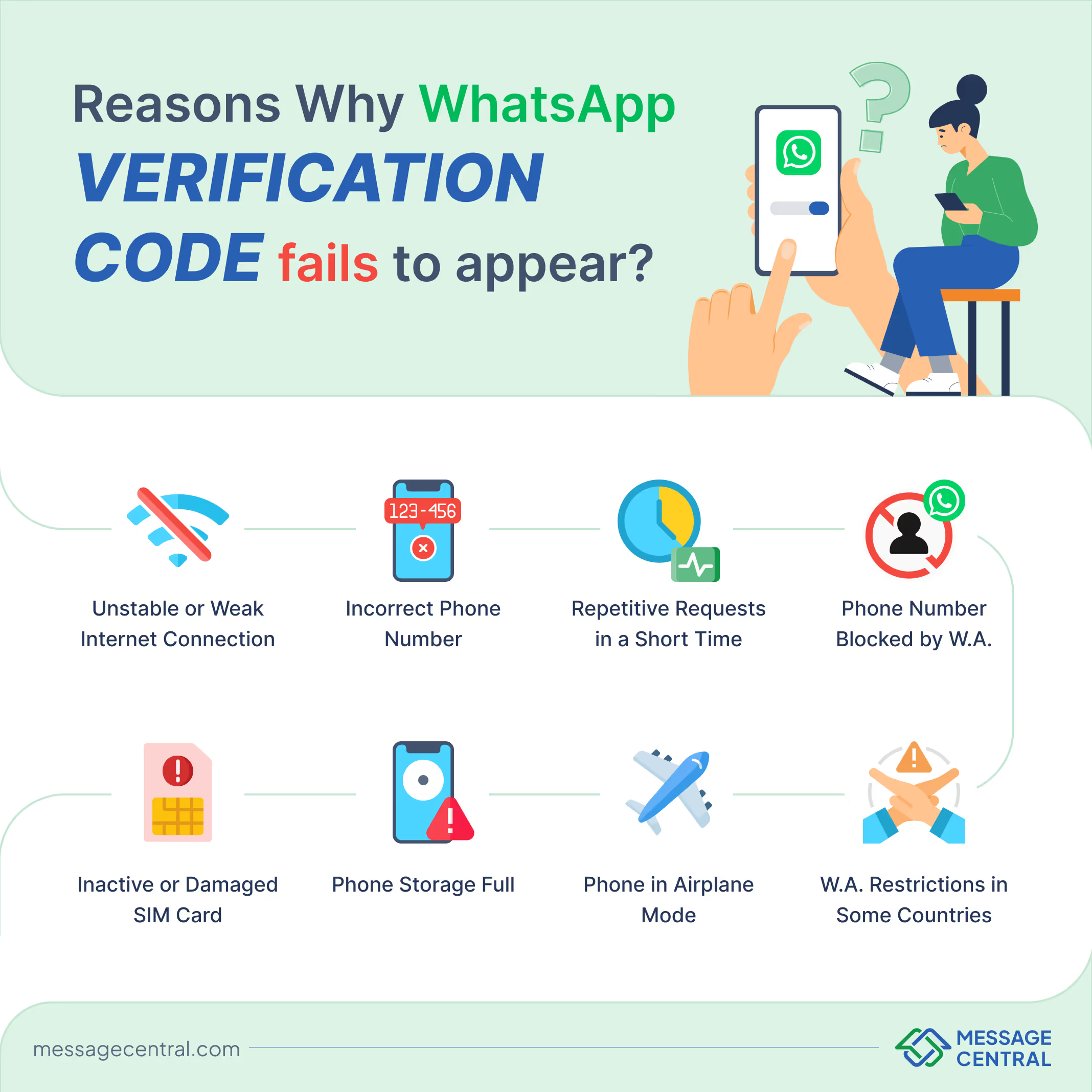
Here are some of the most common reasons why WhatsApp verification code fails to appear
Unstable or Weak Internet Connection
- Even though the OTP is delivered via a text message, a poor internet connection can hinder WhatsApp from processing the verification request.
- Connectivity issues can delay or prevent the code from being generated and sent to your phone.
- A slow or intermittent internet connection can also cause problems during the initial phone number verification stage.
Incorrect Phone Number
- A common mistake during the registration process is entering an incorrect phone number.
- Missing digits, entering the wrong country code or minor typographical errors can cause the OTP to be sent to an unintended number.
- Always double-check your phone number before submitting it for verification.
Multiple Code Requests in a Short Time
- Repeatedly requesting the verification code in a short span of time can lead to WhatsApp flagging your requests as spam.
- This security measure is meant to protect users from suspicious or fraudulent activity. Hence, it may sometimes also hinder the marketing campaigns of businesses. With WhatsApp Now, businesses can send personalised broadcast messages to reach their ROI targets.
- WhatsApp may temporarily delay or block further requests if too many have been made in quick succession.
Phone Number Blocked by WhatsApp
- If WhatsApp has blocked your number due to policy violations or suspicious activity, it will not send the verification code.
- Phone numbers may be blocked if they have been reported or used for activities that breach WhatsApp's terms of service.
- To resolve this, users must contact WhatsApp support to lift the block and proceed with verification.
Inactive or Damaged SIM Card
- Since the OTP is sent via SMS, your SIM card must be active to receive it.
- If the SIM card is inactive, damaged or facing network issues, it won’t be able to receive the code.
- Check with your service provider to ensure your SIM card is in good working condition.
Phone Storage Full
- If your phone's storage is full, it might not be able to receive new SMS messages, including the WhatsApp OTP.
- Clearing up some space by deleting old messages or unused apps can help in receiving the verification code.
- Make sure there’s sufficient storage on your phone for SMS messages to be received.
Phone in Airplane Mode
- When airplane mode is enabled, all network functions, including calls and SMS, are disabled.
- This prevents you from receiving the verification code.
- Ensure airplane mode is turned off while you wait for the verification SMS or call.
WhatsApp Restrictions in Some Countries
- In certain countries, WhatsApp is either restricted or banned due to government regulations or censorship policies.
- These restrictions may prevent you from receiving the verification code as WhatsApp services are limited or blocked altogether.
- To bypass these restrictions, some users rely on VPN services, which can reroute your connection through a country where WhatsApp is accessible.
How to Resolve the Issue
If you're experiencing any of the issues listed above, here are ten ways to address them and ensure you receive your WhatsApp OTP.
Restart Your Device
Sometimes, simply restarting your phone can fix various issues, including connectivity or system glitches that might prevent the delivery of the OTP. After rebooting, try requesting the code again.
Clear WhatsApp Cache
On Android, app cache can occasionally cause issues with performance. Go to your phone’s settings, find WhatsApp under apps, and clear the cache. This can help resolve problems related to app performance, including OTP delivery issues.
Disable Battery Saver or Data Saver Modes
Some phones have battery or data-saving modes that restrict background app activities. These modes can interfere with WhatsApp’s ability to process OTP requests. Ensure these features are turned off, and then try requesting the verification code again.
Ensure Sufficient Storage Space
If your phone’s internal storage is full, it can cause SMS messages to fail to arrive. Check your phone's storage settings and free up some space by deleting unnecessary apps or files to ensure SMS delivery.
Check for SIM Restrictions
If you're using a dual SIM phone, ensure that you have set the correct SIM card as the default for SMS. Some devices may require you to select which SIM card to use for messaging. Also, check if your SIM has any restrictions, like being set to a "data-only" profile.
Verify Network Permissions for WhatsApp
Check your device's app permissions and ensure WhatsApp has access to necessary services like SMS and mobile data. On Android or iOS, you can manage these permissions in the phone’s settings under apps or privacy.
Turn Off VPN or Proxy Services
VPNs or proxy services may disrupt the connection between your phone and WhatsApp’s servers. Temporarily disabling these services may resolve any conflicts preventing OTP delivery.
Check Do Not Disturb (DND) Settings
If your phone has Do Not Disturb mode enabled, it may block notifications, including incoming SMS or calls for the verification code. Disable DND or adjust its settings to allow messages or calls from unknown numbers.
Switch to Another Device for Verification
If you still can’t receive the OTP on your primary device, try inserting your SIM card into another phone to complete the verification process. Once you’ve verified, you can move back to your main device.
Contact Your Carrier for Message Delivery Issues
If none of the above solutions work, your mobile service provider may be experiencing issues. Contact your carrier to check if there are network outages, blocked SMS or any issues specific to your number that might be affecting the delivery of the WhatsApp OTP.
Conclusion
In conclusion, not receiving a WhatsApp verification code can be a frustrating experience, but with a few simple steps, it can often be resolved quickly. Verifying your phone number, improving your internet connection and ensuring your SIM card is active are key factors in resolving the issue. For more persistent problems, options like receiving the code via phone call or checking WhatsApp servers may prove helpful.
For Businesses: How to Add Reliable WhatsApp OTP to YOUR App
Everything above is for userstrying to receive a WhatsApp verification code on their own phone. But if you are a business building an app, website, or platform and want to send WhatsApp OTP verification codes to YOUR customers — for signup, login, transaction confirmation, or password reset — this section is for you. Adding WhatsApp OTP alongside or instead of SMS OTP materially improves your authentication conversion rate.
Why WhatsApp OTP Beats SMS OTP for User Verification
WhatsApp OTP has emerged as the fastest-growing OTP delivery channel in 2026 for four reasons:
- Higher open rates. WhatsApp OTP delivers approximately 98 percent open rates versus SMS at 95 percent, because the codearrives in an app the user actively checks 30-50 times a day rather than apassive SMS inbox.
- Lower cost. WhatsApp OTP in the US market runsapproximately $0.00422 per delivered code via the WhatsApp OTPAPI — a fraction of SMS OTP at $0.0075-$0.015 per message on A2P10DLC routes. In markets like India, Brazil, UAE, and Mexico the cost advantagewidens further.
- TCPA-exempt in the US market. WhatsApp OTPtraverses TLS-secured IP rather than the PSTN, eliminating the $500-$1,500 pernon-consenting message private-right-of-action class-action exposure that SMSOTP carries under 47 USC 227. Meaningful for fintech, healthcare, and anyregulated vertical.
- SIM-swap resistant. WhatsApp accounts aredevice-bound and protected by a separate two-step PIN. A phone-number hijackerwho swaps the victim's SIM does not automatically read WhatsApp OTPs the waythey can intercept SMS OTPs. Better fraud posture for high-value accounts.
The Modern Multi-Channel OTP Architecture
The winning pattern in 2026 is not WhatsApp OTP alone, but WhatsApp OTP as primary with automatic SMS OTP API and voice OTP fallback. Not every user has WhatsApp installed, and not every WhatsApp message delivers first attempt. Multi-channel architecture pushes authentication completion from 92-95 percent (single-channel) to 99percent-plus. The OTP API handles failover automatically — your app does not write channel-switching logic. See WhatsApp OTP vs SMS OTP for the detailed decision framework and SMS OTP Verification Service for the SMS fallback layer.
How to Integrate WhatsApp OTP into Your App
WhatsApp OTP integration follows a standard two-endpoint REST pattern that any developer can implement in 1-3engineering hours:
- Send endpoint. Your app calls the OTP API withthe user's phone number and channel preference; the API generates acryptographically random code, dispatches it via WhatsApp Authenticationtemplate, and returns a transaction ID.
- Verify endpoint. When the user enters the codein your app, you call with the transaction ID and the code; the API validatesand returns success or failure.
WhatsApp OTP runs on the broader WhatsApp Business API infrastructure. To ship faster, use a Meta Business Partner that pre-approves Authentication templates as part of onboarding — that shortens time-to-first-OTP from weeks to days. See WhatsApp OTP API guide for the full implementation walkthrough and WhatsApp OTP Pricing for cost detail.
Pre-Flight Phone Verification (Anti-Fraud)
Before you spend on any OTP send, run the phone number through a Phone Number Verification API pre-flight check. This catches disposable numbers,VoIP, and known-fraud carriers before the OTP dispatches — cheaper than eatingthe OTP cost on a fake signup. Pair this with WhatsApp OTP for a fraud-hardenedauthentication stack.
Important note: the reason "my WhatsApp verification code is not appearing" complaints from real users often have four business-side root causes — aggregator routing instead of direct-carrier connectivity (80-90% delivery vs 95-99%), missing regulatory registration (A2P 10DLC in the US, DLT in India, TDRA in the UAE),single-channel architecture without failover, and no pre-flight number verification. If your customers are complaining about WhatsApp OTP delivery, the fix is almost always on your infrastructure side, not theirs.
Get Started with WhatsApp OTP for Your Business
WhatsAppNow from Message Central is a Meta Business Partner offering direct WhatsApp Business API access with multi-channel OTP architecture (WhatsApp OTP primary +SMS OTP + voice OTP fallback) through a single API. Direct carrier connectivityin the US, India, UAE, Brazil, Nigeria, and 200+ countries. A2P 10DLC handlingfor US SMS fallback, DLT for India, TDRA for UAE. Sub-10-second deliverylatency with 99.9% uptime SLA. SDKs in Node.js, Python, Java, Go, PHP, Ruby,.NET. Green-tick verification support for eligible brands.
To start sending WhatsApp OTP from your app, sign up at the WhatsAppNow console for free trial credits — no credit card required. Detailed API documentation at VerifyNow API. For provider comparison see Best OTP Service Provider USA 2026.
Frequently Asked Questions
Why doesn't the WhatsApp verification code appear on my phone?
Common reasons: wrong phone number entered, poor network signal, VoIP or virtual number rejected by WhatsApp, blocked SMS from unknown senders in your phone settings, Do-Not-Disturb mode enabled, WhatsApp account temporarily banned or restricted, carrier filtering the WhatsApp SMS verification, or the previous OTP has already expired. Wait 60 seconds and request a resend. If SMS still fails, tap "Call me" for voice verification.
Can I use WhatsApp OTP to verify users in my own app or business?
Yes. Businesses can send WhatsApp OTP to their customers through the WhatsApp OTP API from a Meta Business Partner. WhatsApp OTP delivers 98% open rates versus SMS at 95%, costs approximately $0.00422 per delivered OTP in the US market, displays your business name with green verification tick, is TCPA-exempt (traverses TLS-secured IP not PSTN), and is SIM-swap resistant. Basic integration takes 1-3 engineering hours.
What is the difference between WhatsApp's own verification code and WhatsApp OTP for businesses?
WhatsApp's own verification code is what you receive when activating WhatsApp on a new device — it arrives via SMS or voice call from WhatsApp to verify you control the phone number. WhatsApp OTP for businesses is different: it's a one-time password that YOUR app or website sends to YOUR customers via the WhatsApp app to verify their identity for signup, login, or transaction. Businesses build this into their auth flows using a WhatsApp OTP API on the WhatsApp Business Platform.