
Step 1: Create Account
Console Access & Account Creation
- Visit https://console.messagecentral.com
- Click on e-KycNow
- You will be redirected to the e-KYC Console
New Users (First-Time Registration)
- Register your account in e-KYC
- Complete the registration process
- While creating your account, enter your company name (this will be used later in API configurations)

Step 2: Create Flow
Flow Creation Guidelines
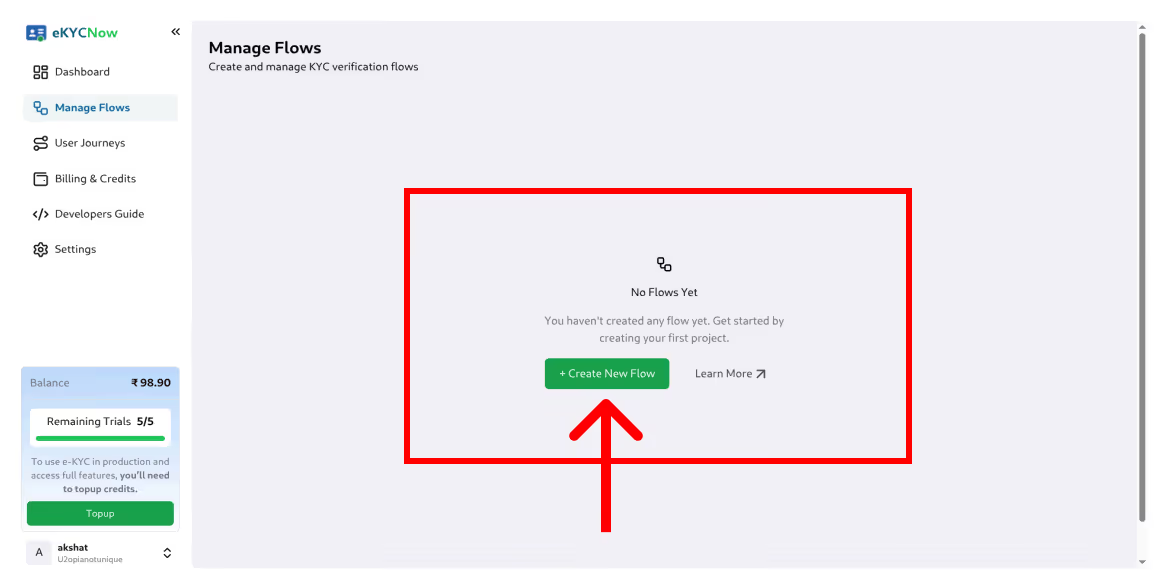
- To create a flow (Basic or Premium), click on Create Flow in the console.
- Select the required flow type and complete all mandatory configuration fields.
- Once a flow is created, all fields are immutable, except for the redirection URL.
- If any configuration is incorrect, the flow cannot be edited or deleted; a new flow must be created.
Flow Types
Basic Flow
Designed for low-risk onboarding scenarios where speed is a priority.
This flow verifies the authenticity of government-issued identity documents using global databases.
Premium Flow (Most Secure)
Our most secure verification flow.
Combines document verification with biometric liveness detection and AML screening for enhanced compliance and fraud prevention.
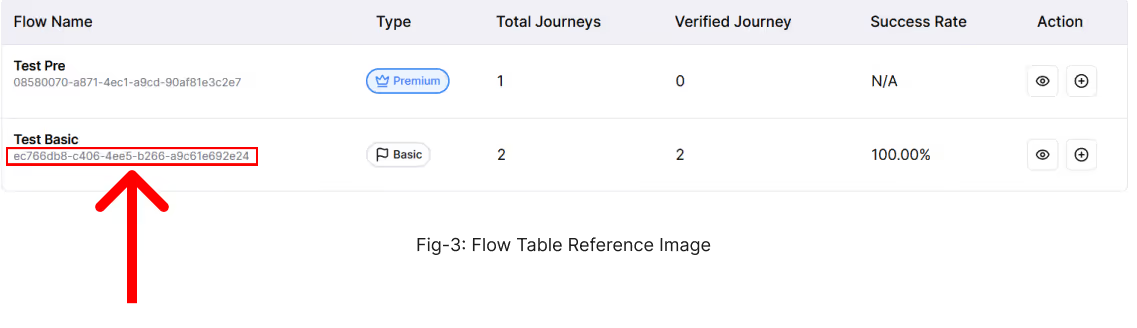
Once the flow is created, a Flow ID will be generated for both Basic and Premium flows.
This Flow ID is required for API integration and must be passed in the request headers when invoking the KYC APIs.
Generate API Key
- Navigate to the Developer Guide section in the console and click on Generate API Key.
- Copy and securely store the generated API key, as it will be required for all API requests.
- Keep the API key confidential at all times; if it is exposed, lost, or compromised, immediately generate a new key.
- Please note that only one active API key is allowed at a time, and generating a new key will automatically invalidate the previous one.

Trial Flow Usage
For testing purposes, you can use the Trial Flow feature available in the console.
- To begin, copy the Trial API Key from the Developer Guide section.
Navigate to the Manage Flows page and click on the “+” icon for the desired flow.
- Fill in the required details and click Generate. Upon successful generation, a KYC redirection URL will be provided.
Note: The generated URL is valid for 30 minutes only and must be used strictly for testing purposes. Do not share this URL, as it is single-use and time-bound. You have only five (5) free trial attempts are allowed. Each time a trial URL is generated, one trial attempt is consumed.
Sample Trial URL
https://ekyc-staging.messagecentral.com/kyc/flow/aEzRTHuaJcwda4WtETc119_S-ljpyGpeo0aLzz4705w
Note: Sample trial URLs are generated with a predefined Flow ID.
Do not modify or replace this Flow ID with another flow, as doing so may result in unexpected errors and unnecessary consumption of trial credits.
Generate URL from API
Endpoint
POST https://ekyc.messagecentral.com/ekyc/api/v1/redirection/generate-url
Authentication, Headers & Body
You must pass the following headers and body with every request:
Example Headers and Body
flow_id: HfBIyufQ 9O9AauFtBMKRi9kHPXlStAfFlbvg64JzIM
api_key: Bearer <YOUR API KEY>
company_name: <YOUR COMPANY NAME>
Content-Type: application/json
cURL Example
curl --location 'https://ekyc.messagecentral.com/ekyc/api/v1/redirection/generate-url' \

--header flow_id: FLOW_ID \

--header api_key: Bearer YOUR_API_KEY \

--form company_name="YOUR_COMPANY_NAME"
Note: The flow_id and api_key shown in this example are for demonstration purposes only. You must replace them with your own values generated from the console. Never expose your API key in client-side applications.
Response
Success Response (200 OK)
{

 "url": "https://ekyc.messagecentral.com/kyc/flow HfBIyufQ-9O9AauFtBMKRi9kHPXlStAfFlbvg64JzIM",

 "token": "HfBIyufQ-9O9AauFtBMKRi9kHPXlStAfFlbvg64JzIM",

 "journey_id": "M17682023316961BQG_SE",

 "expires_in_minutes": 30,

 "message": "Embed this URL in your application for KYC verification"

}
Response Fields Explained
Note: The generated URL expires after the specified time. You must regenerate it after expiration.
Error Responses (401 Unauthorized)
1. Missing Company Name
{
 "detail": "Missing company name in Header"
}
Ensure company_name is present in the request body.
2. Invalid API Key Format
{

 "detail": "API Key must be 'Bearer '"

}
Make sure the API key is prefixed with Bearer .
3. Missing Flow ID
{

 "detail": "Missing flow_id header/query."

}
Ensure flow_id is sent in the request headers.
Security & Usage Guidelines (Important)
This API must be called strictly from your backend server.
Do NOT call this API from frontend applications
Do not call this API directly from:
- Browser (React, Angular, Vue, etc.)
- Mobile apps (Android / iOS)
- Client-side JavaScript
Exposing this API on the frontend may leak your API key, which can lead to unauthorized access and misuse.
Security Best Practices
Always store your api_key in:
- Environment variables
- Secret managers (AWS Secrets Manager, Vault, etc.)
Rotate API keys periodically
Regenerate URLs only when required (URLs are time-bound)
Rate Limiting / Abuse Note
Note: Excessive or abusive requests may be rate-limited to ensure platform stability.
For questions and concerns, reachout to us!

Frequently Asked Questions
What is an eKYC API?
An eKYC API is a digital identity verification interface that allows businesses to verify customer identities programmatically using official identity databases such as Aadhaar or PAN. It enables real-time identity verification during digital onboarding without manual document processing.
How does eKYC API integration work?
eKYC API integration typically involves sending customer identity data such as Aadhaar or PAN through secure API endpoints. The verification system validates the information with authorized databases and returns verified identity details to the application.
How long does eKYC API integration take?
Most businesses can integrate eKYC APIs within a few minutes depending on their development environment. Many platforms provide sandbox environments and SDKs that allow developers to test identity verification workflows before moving to production.
Which programming languages can be used to integrate eKYC APIs?
eKYC APIs can typically be integrated using any backend language that supports HTTP requests, including:
- Python
- Node.js
- Java
- PHP
- .NET
- Go
Most providers offer REST APIs with JSON responses for easy integration.
What identity data is returned by eKYC APIs?
Depending on the verification method, eKYC APIs may return verified demographic information such as:
- Name
- Date of birth
- Gender
- Address
- Photograph
- Verification status
Is eKYC legal in India?
Yes. Digital eKYC is widely used in India and is regulated under guidelines issued by authorities such as the Reserve Bank of India (RBI) and UIDAI for Aadhaar-based verification.
What is Aadhaar eKYC?
Aadhaar eKYC is a digital identity verification method that uses the Aadhaar database to verify a customer's identity through OTP or biometric authentication.
What is Video KYC in India?
Video KYC is a remote identity verification process allowed by RBI under the Video Customer Identification Process (V-CIP) framework. It allows financial institutions to verify customers through live video interactions.
What is PAN verification API?
A PAN verification API allows businesses to validate a customer's Permanent Account Number with official records to confirm identity and prevent fraud.
What compliance requirements apply to eKYC APIs in India?
Businesses implementing eKYC must follow regulatory guidelines including:
- customer consent collection
- audit logging of verification transactions
- Aadhaar data masking
- secure storage of identity data
What is the difference between Aadhaar eKYC and Video KYC APIs?
Aadhaar eKYC uses OTP or biometric authentication for automated verification, while Video KYC involves live video verification with additional fraud checks such as face matching and liveness detection.
Can startups use eKYC APIs?
Yes. Many startups integrate eKYC APIs through authorized identity verification platforms that provide compliant infrastructure without requiring direct government authorization.
What security measures are used in eKYC APIs?
Secure eKYC APIs typically use:
- encrypted API communication
- authentication tokens
- Secure identity data storage
- fraud detection systems
How scalable are eKYC APIs?
Modern eKYC APIs are designed to handle high verification volumes and can support thousands of identity verification requests per minute depending on infrastructure.