
Paso 1: crear una cuenta
Acceso a la consola y creación de cuentas
- Visita https://console.messagecentral.com
- Haga clic en e-KYCnow
- Serás redirigido a la consola e-KYC
Nuevos usuarios (registro por primera vez)
- Registra tu cuenta en e-KYC
- Complete el proceso de registro
- Al crear su cuenta, introduzca el nombre de su empresa (se utilizará más adelante en las configuraciones de la API)

Paso 2: Crear flujo
Pautas de creación de flujos
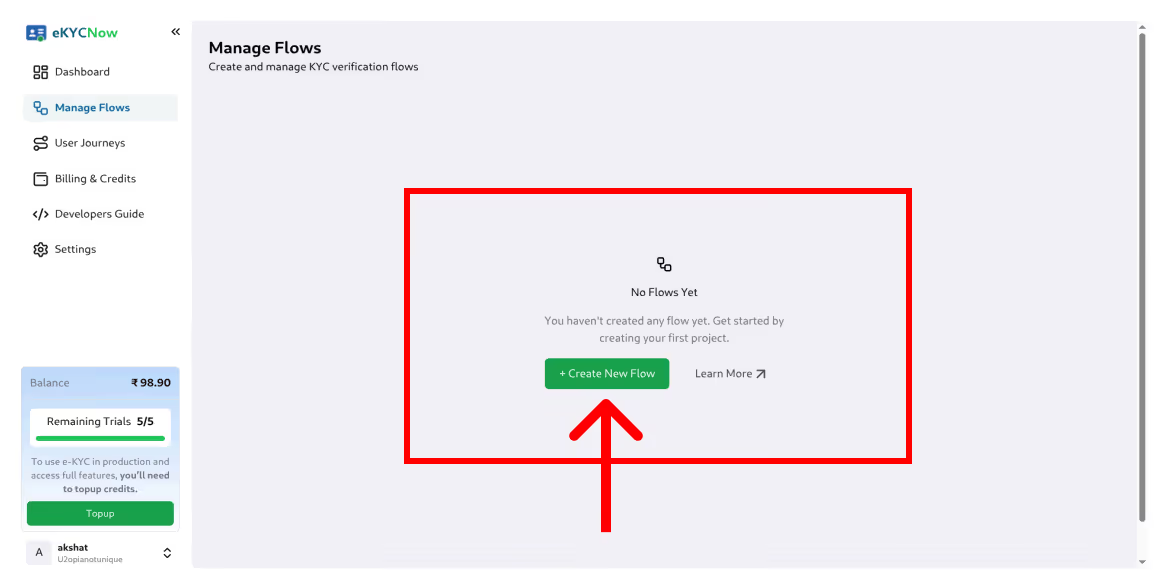
- Para crear un flujo (Básico o Premium), haz clic en Crear flujo en la consola.
- Seleccione el tipo de flujo requerido y complete todos los campos de configuración obligatorios.
- Una vez que se crea un flujo, todos los campos son inmutables, excepto la URL de redirección.
- Si alguna configuración es incorrecta, el flujo no se puede editar ni eliminar; se debe crear un flujo nuevo.
Tipos de flujo
Flujo básico
Diseñado para escenarios de incorporación de bajo riesgo en los que la velocidad es una prioridad.
Este flujo verifica la autenticidad de los documentos de identidad emitidos por el gobierno utilizando bases de datos globales.
Premium Flow (el más seguro)
Nuestro flujo de verificación más seguro.
Combina la verificación de documentos con la detección biométrica de la vitalidad y la detección de AML para mejorar el cumplimiento y la prevención del fraude.
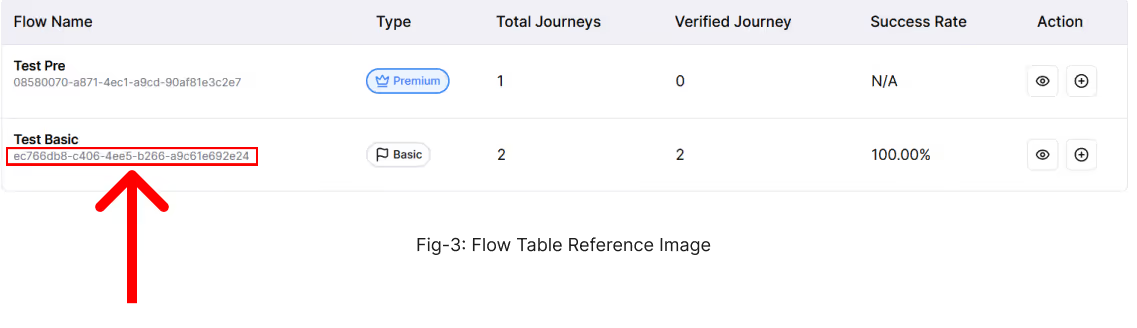
Una vez creado el flujo, se generará un ID de flujo para los flujos Básico y Premium.
Este ID de flujo es obligatorio para la integración de la API y debe pasarse a los encabezados de la solicitud al invocar las API de KYC.
Generar clave de API
- Navegue hasta la sección Guía para desarrolladores de la consola y haga clic en Generar clave de API.
- Copie y almacene de forma segura la clave de API generada, ya que será necesaria para todas las solicitudes de API.
- Mantenga la confidencialidad de la clave de API en todo momento; si queda expuesta, perdida o comprometida, genere inmediatamente una nueva clave.
- Tenga en cuenta que solo se permite una clave de API activa a la vez, y la generación de una nueva clave invalidará automáticamente la anterior.

Uso de Trial Flow
Para realizar pruebas, puede utilizar la función Trial Flow disponible en la consola.
- Para empezar, copia la clave de API de prueba de la sección Guía para desarrolladores.
Navegue hasta la página Administrar flujos y haga clic en el icono «+» del flujo deseado.
- Complete los detalles requeridos y haga clic en Generar. Tras la generación correcta, se proporcionará una URL de redireccionamiento de KYC.
Nota: La URL generada es válida solo durante 30 minutos y debe usarse exclusivamente con fines de prueba. No compartas esta URL, ya que es de un solo uso y tiene un límite de tiempo. Solo tiene cinco (5) intentos de prueba gratuitos permitidos. Cada vez que se genera una URL de prueba, se consume un intento de prueba.
Ejemplo de URL de prueba
https://ekyc-staging.messagecentral.com/kyc/flow/aEzRTHuaJcwda4WtETc119_S-ljpyGpeo0aLzz4705w
Nota: Las URL de prueba de ejemplo se generan con un ID de flujo predefinido.
No modifique ni sustituya este ID de flujo por otro flujo, ya que puede provocar errores inesperados y un consumo innecesario de créditos de prueba.
Generar URL desde la API
Punto final
PUBLICAR https://ekyc.messagecentral.com/ekyc/api/v1/redirection/generate-url
Autenticación, encabezados y cuerpo
Debes pasar los siguientes encabezados y cuerpos con cada solicitud:
Ejemplo de encabezados y cuerpo
flow_id: hfbiyufq 9o9aauftbmkri9khpXLstafflbvg64jzim
api_key: Portador <YOUR API KEY>
nombre_empresa: <YOUR COMPANY NAME>
Tipo de contenido: application/json
Ejemplo de cURL
curl --location 'https://ekyc.messagecentral.com/ekyc/api/v1/redirection/generate-url' \

--header flow_id: FLOW_ID \

--header api_key: Bearer YOUR_API_KEY \

--form company_name="YOUR_COMPANY_NAME"
Nota: Los flow_id y api_key que se muestran en este ejemplo son solo para fines de demostración. Debes reemplazarlos por tus propios valores generados desde la consola. Nunca expongas tu clave de API en aplicaciones del lado del cliente.
Respuesta
Respuesta exitosa (200 OK)
{

 "url": "https://ekyc.messagecentral.com/kyc/flow HfBIyufQ-9O9AauFtBMKRi9kHPXlStAfFlbvg64JzIM",

 "token": "HfBIyufQ-9O9AauFtBMKRi9kHPXlStAfFlbvg64JzIM",

 "journey_id": "M17682023316961BQG_SE",

 "expires_in_minutes": 30,

 "message": "Embed this URL in your application for KYC verification"

}
Explicación de los campos de respuesta
Nota: La URL generada caduca tras el tiempo especificado. Debe volver a generarla después de que caduque.
Respuestas de error (401 no autorizadas)
1. Falta el nombre de la empresa
{
 "detail": "Missing company name in Header"
}
Asegúrese de que company_name esté presente en el cuerpo de la solicitud.
2. Formato de clave de API no válido
{

 "detail": "API Key must be 'Bearer '"

}
Asegúrese de que la clave de API tenga el prefijo Bearer.
3. Falta el ID de flujo
{

 "detail": "Missing flow_id header/query."

}
Asegúrese de que flow_id se envíe en los encabezados de la solicitud.
Pautas de seguridad y uso (importante)
Esta API se debe llamar exclusivamente desde tu servidor backend.
NO llame a esta API desde aplicaciones frontend
No llame a esta API directamente desde:
- Navegador (React, Angular, Vue, etc.)
- Aplicaciones móviles (Android/iOS)
- JavaScript del lado del cliente
Exponer esta API en la interfaz puede filtra tu clave de API, lo que puede dar lugar a un acceso no autorizado y a un uso indebido.
Mejores prácticas de seguridad
Guarda siempre tu api_key en:
- Variables de entorno
- Administradores secretos (AWS Secrets Manager, Vault, etc.)
Rote las claves de API periódicamente
Regenere las URL solo cuando sea necesario (las URL tienen un límite de tiempo)
Nota de limitación o abuso de velocidad
Nota: Las solicitudes excesivas o abusivas pueden tener una velocidad limitada para garantizar la estabilidad de la plataforma.
Si tiene preguntas e inquietudes, ¡comuníquese con nosotros!

Descargar la guía del usuario
Preguntas frecuentes
¿Qué es una API de eKYC?
Una API de eKYC es una interfaz de verificación de identidad digital que permite a las empresas verificar las identidades de los clientes mediante programación utilizando bases de datos de identidad oficiales como Aadhaar o PAN. Permite la verificación de identidad en tiempo real durante la incorporación digital sin procesar manualmente los documentos.
¿Cómo funciona la integración de la API de eKYC?
La integración de la API de eKYC normalmente implica el envío de datos de identidad del cliente, como Aadhaar o PAN, a través de puntos finales de API seguros. El sistema de verificación valida la información con bases de datos autorizadas y devuelve los detalles de identidad verificados a la aplicación.
¿Cuánto tiempo lleva la integración de la API de eKYC?
La mayoría de las empresas pueden integrar las API de eKYC en unos minutos, según su entorno de desarrollo. Muchas plataformas proporcionan entornos aislados y SDK que permiten a los desarrolladores probar los flujos de trabajo de verificación de identidad antes de pasar a la producción.
¿Qué lenguajes de programación se pueden usar para integrar las API de eKYC?
Las API de eKYC normalmente se pueden integrar mediante cualquier lenguaje de backend que admita solicitudes HTTP, entre los que se incluyen:
- Pitón
- Node.js
- Java
- PHP
- .NET
- Ve
La mayoría de los proveedores ofrecen API REST con respuestas JSON para facilitar la integración.
¿Qué datos de identidad devuelven las API de eKYC?
Según el método de verificación, las API de eKYC pueden devolver información demográfica verificada, como:
- Nombre
- Fecha de nacimiento
- Género
- Dirección
- Fotografía
- Estado de verificación
¿Es legal el eKYC en la India?
Sí. El eKYC digital se usa ampliamente en la India y está regulado según las directrices emitidas por autoridades como el Banco de la Reserva de la India (RBI) y la UIDAI para la verificación basada en Aadhaar.
¿Qué es Aadhaar eKYC?
El eKYC de Aadhaar es un método de verificación de identidad digital que utiliza la base de datos de Aadhaar para verificar la identidad de un cliente mediante OTP o autenticación biométrica.
¿Qué es Video KYC en la India?
El KYC por vídeo es un proceso de verificación de identidad remoto permitido por RBI en el marco del proceso de identificación de clientes por vídeo (V-CIP). Permite a las instituciones financieras verificar a los clientes mediante interacciones de vídeo en directo.
¿Qué es la API de verificación PAN?
Una API de verificación de PAN permite a las empresas validar el número de cuenta permanente de un cliente con registros oficiales para confirmar la identidad y prevenir el fraude.
¿Qué requisitos de cumplimiento se aplican a las API de eKYC en la India?
Las empresas que implementan eKYC deben seguir las pautas reglamentarias, que incluyen:
- recopilación de consentimiento del cliente
- registro de auditoría de las transacciones de verificación
- Enmascaramiento de datos de Aadhaar
- almacenamiento seguro de datos de identidad
¿Cuál es la diferencia entre las API eKYC y Video KYC de Aadhaar?
El eKYC de Aadhaar utiliza la autenticación OTP o biométrica para la verificación automática, mientras que el KYC por vídeo implica la verificación de vídeo en directo con comprobaciones de fraude adicionales, como la comparación de rostros y la detección de la vida real.
¿Pueden las startups usar las API de eKYC?
Sí. Muchas empresas emergentes integran las API de eKYC a través de plataformas de verificación de identidad autorizadas que proporcionan una infraestructura compatible sin necesidad de una autorización gubernamental directa.
¿Qué medidas de seguridad se utilizan en las API de eKYC?
Las API de eKYC seguras suelen utilizar:
- comunicación API cifrada
- tokens de autenticación
- Almacenamiento seguro de datos de identidad
- sistemas de detección de fraudes
¿Qué tan escalables son las API de eKYC?
Las modernas API de eKYC están diseñadas para gestionar grandes volúmenes de verificación y pueden admitir miles de solicitudes de verificación de identidad por minuto, según la infraestructura.