You might not be able to signup with us right now as we are currently experiencing a downtime of 15 mins on our product. Request you to bear with us.

Home
Right Chevron Icon
Blog
Right Chevron IconRight Chevron Icon
Send SMS with CleverTap CRM Using Message Central

Send SMS with CleverTap CRM Using Message Central

Profile Headshot of Mehak Dhingra
Mehak Dhingra

4
mins read

July 16, 2024

Send SMS with CleverTap CRM Using Message Central - Blog Thumbnail

Key Takeways

With CleverTap integration, you can start using Message Central’s global SMS connectivity along with CleverTap’s capabilities for your campaigns.

Prerequisites for Integration

Before you begin with integration, ensure you have:

  1. A Message Central account with SMS permissions
  2. A CleverTap account  

Integration Steps

This process involves the following three significant steps:

  1. Message Central Account Details

The following details would be required. For this you need to create an account in Message Central. The following parameters are required: Bullet Points

Customer ID - You can get your customer Id from Message Central home page

Email - This is the email with which you have created your account

Password - This is the password with which you have created your account

  1. Adding Message Central Details on CleverTap Dashboard

Please follow the below steps to add Message Central details on CleverTap dashboard: -

Step 1 - After logging into dashboard, navigate to Settings > Channels > SMS

Step 2 - Click on “+Add Provider”. (please check the image below)
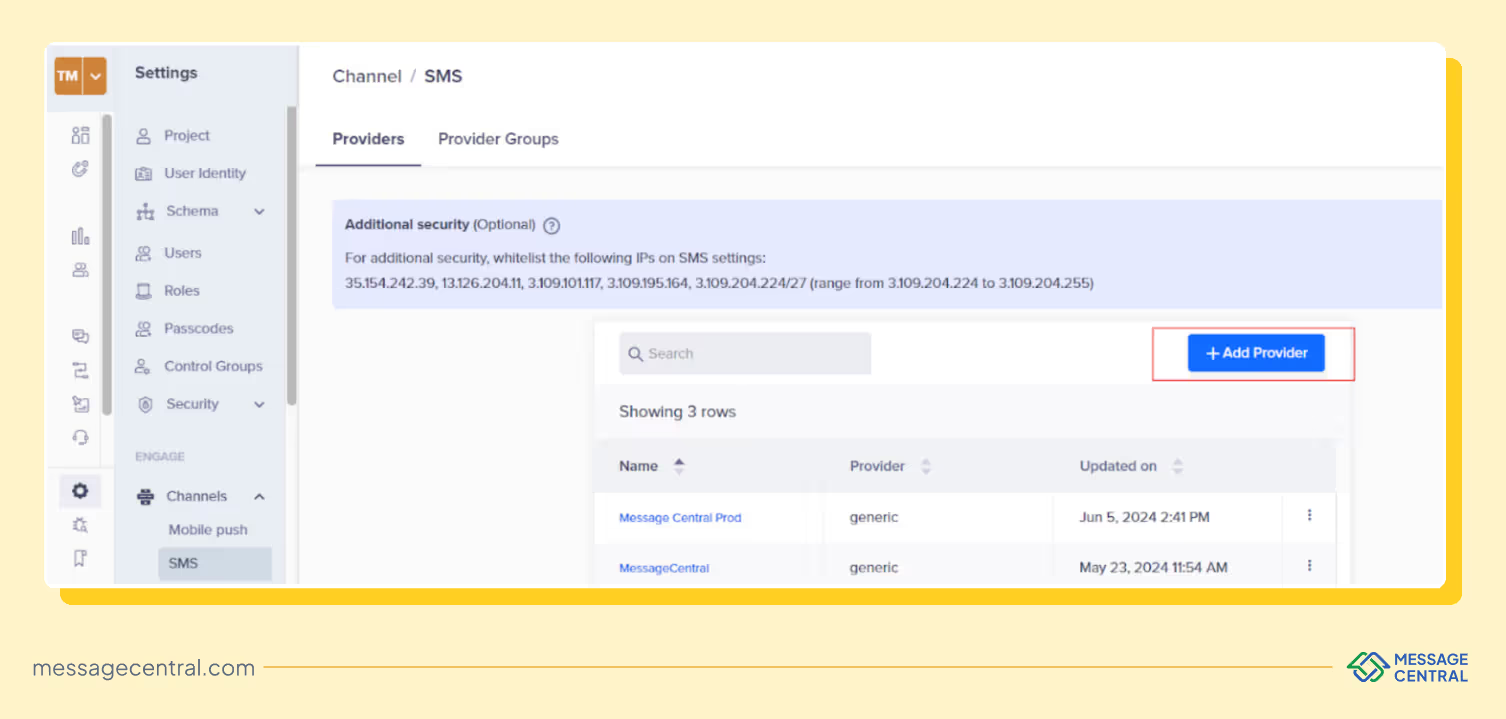
Send SMS with CleverTap CRM Using Message Central - Add Provider

Step 3 - Under Setup, enter the following details:

Step 4 - Under Header, enter the following Keys with respective values

Key Value
customerId Your Customer Id (from MessageCentral dashboard)
email Your Email (used for MessageCentral login)
password Your Password (used for MessageCentral password)
Content-Type application/json
account Your Account Id (from CleverTap) e.g., 6K9-***-**7Z

You need to click on “Add Pairs“ to enter 5 Keys & values listed below:

Step 5 - Under Parameters, select Type as Json and paste the below code

Step 6 - Click Save to save the details.  

      In case there is an error: Dynamic Variable cannot be added or deleted.

      Just wait for a few minutes and click save.

Send a Test SMS

To ensure that the integration is successful, send a test SMS as follows:
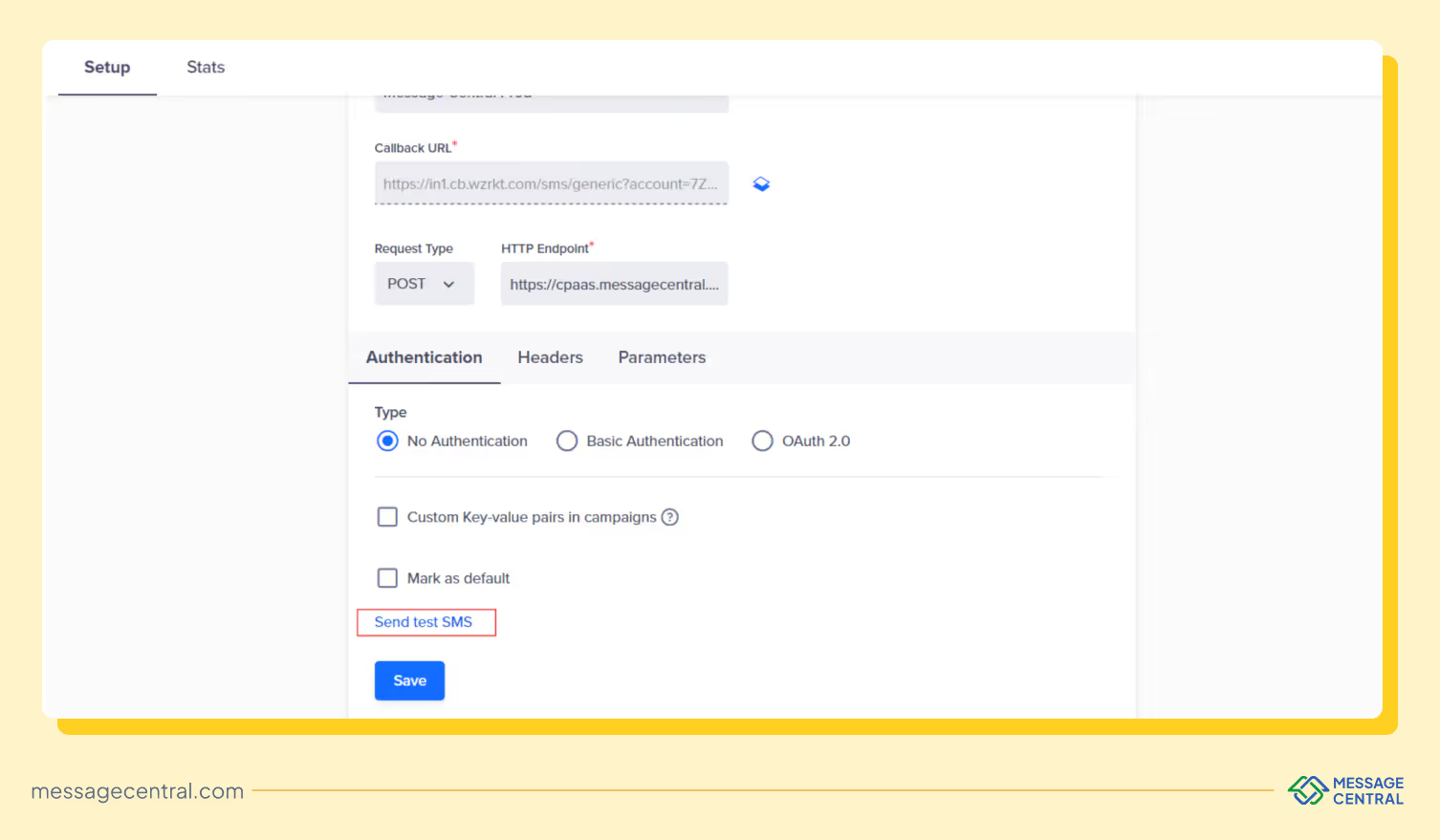
Send SMS with CleverTap CRM Using Message Central - Send a Test SMS Dashboard Screenshot
  1. Click the “Send Test SMS” before creating SMS campaigns and journeys.

(You can find the ‘Send test SMS’ button above ‘Save’ button)

  1. Enter the following details:
    • Country Code and Mobile Number: Enter the country code and mobile number to which you want to send the test message
    • Message: Eg - Welcome to Message Central. We are delighted to have you here! - Powered by U2opia

NOTE: You need to enter your whitelisted content or message which is approved by DLT for your SenderID.

Frequently Asked Questions

How do I choose the right OTP service provider?

When selecting an OTP SMS service provider, focus on:

  • Delivery reliability and speed
  • Global coverage and local compliance
  • Multi-channel support and fallback
  • Ease of integration
  • Pricing transparency

The right provider should not just send OTPs but ensure they are delivered consistently across regions and networks.

Not all OTP SMS service providers are built the same.

Some optimize for cost, others for flexibility but very few balance delivery reliability, global coverage and ease of use. And that balance is what actually impacts whether your users receive OTPs on time.

If OTP is critical to your product, focus on:

  • reliable delivery (not just sending)
  • multi-channel fallback
  • scalability across regions

Try It for Yourself

Why is multi-channel OTP important?

Relying only on SMS can lead to failed verifications due to:

  • network issues
  • telecom filtering
  • device limitations

Multi-channel OTP systems (SMS + WhatsApp + voice) improve success rates by automatically retrying through alternative channels if one fails.

What is the best OTP SMS service provider in India?

Some of the commonly used OTP SMS service providers in India include MSG91, Exotel and 2Factor.

That said, India has additional challenges like DLT compliance and operator filtering. Platforms that handle these internally while also offering fallback options tend to provide more consistent OTP delivery.

Which is the cheapest OTP service provider?

Providers like Fast2SMS and 2Factor are often considered among the cheapest OTP service providers, especially in India.

However, lower pricing can come with trade-offs such as:

  • lower route quality
  • higher delivery delays
  • limited fallback options

For mission-critical OTP flows, reliability often matters more than just cost.

Which is the best OTP service provider in 2026?

The best OTP service provider depends on your use case.

  • For global scale and flexibility: Twilio, Infobip
  • For cost-effective APIs: Plivo
  • For India-focused SMS OTP: MSG91, Exotel

However, platforms like Message Central stand out by balancing global coverage, multi-channel fallback and ease of deployment, making them suitable for businesses that prioritize delivery reliability.

What is an OTP service provider?

An OTP service provider enables businesses to send temporary verification codes to users via channels like SMS, WhatsApp or voice to authenticate logins, transactions or sign-ups.

Modern OTP SMS service providers go beyond just sending messages, they ensure reliable delivery using optimized routing, retries and sometimes multi-channel fallback.

Ready to Get Started?

Build an effective communication funnel with Message Central.

Weekly Newsletter Right into Your Inbox

Envelope Icon
Thank you! Your submission has been received!
Oops! Something went wrong while submitting the form.
02271264300
phone-callphone-call