Overview
VerifyNow is a mobile number verification and authentication service developed by Message Central. It provides a fast, reliable, and cost-effective way to verify mobile numbers and perform multi-factor authentication (MFA) across SMS and WhatsApp channels.
In the digital ecosystem, mobile numbers have become the universal user identity. VerifyNow enables your application—whether web or mobile—to authenticate users’ mobile numbers with ease and security.
Key Features
- Multi-channel verification: VerifyNow supports OTP delivery via both SMSand WhatsApp channels.
- Pre-approved templates and sender IDs: Sender IDs and message templates are already approved, so you don’t have to wait for regulatory clearance.
- Automatic fallback: If message delivery fails on the primary channel, the system automatically retries using an alternate supported channel.
- SDK & API options: Choose between streamlined SDK installation or direct integration with the flexible text verification API, depending on your implementation needs
Use Case: OTP-Based Authentication
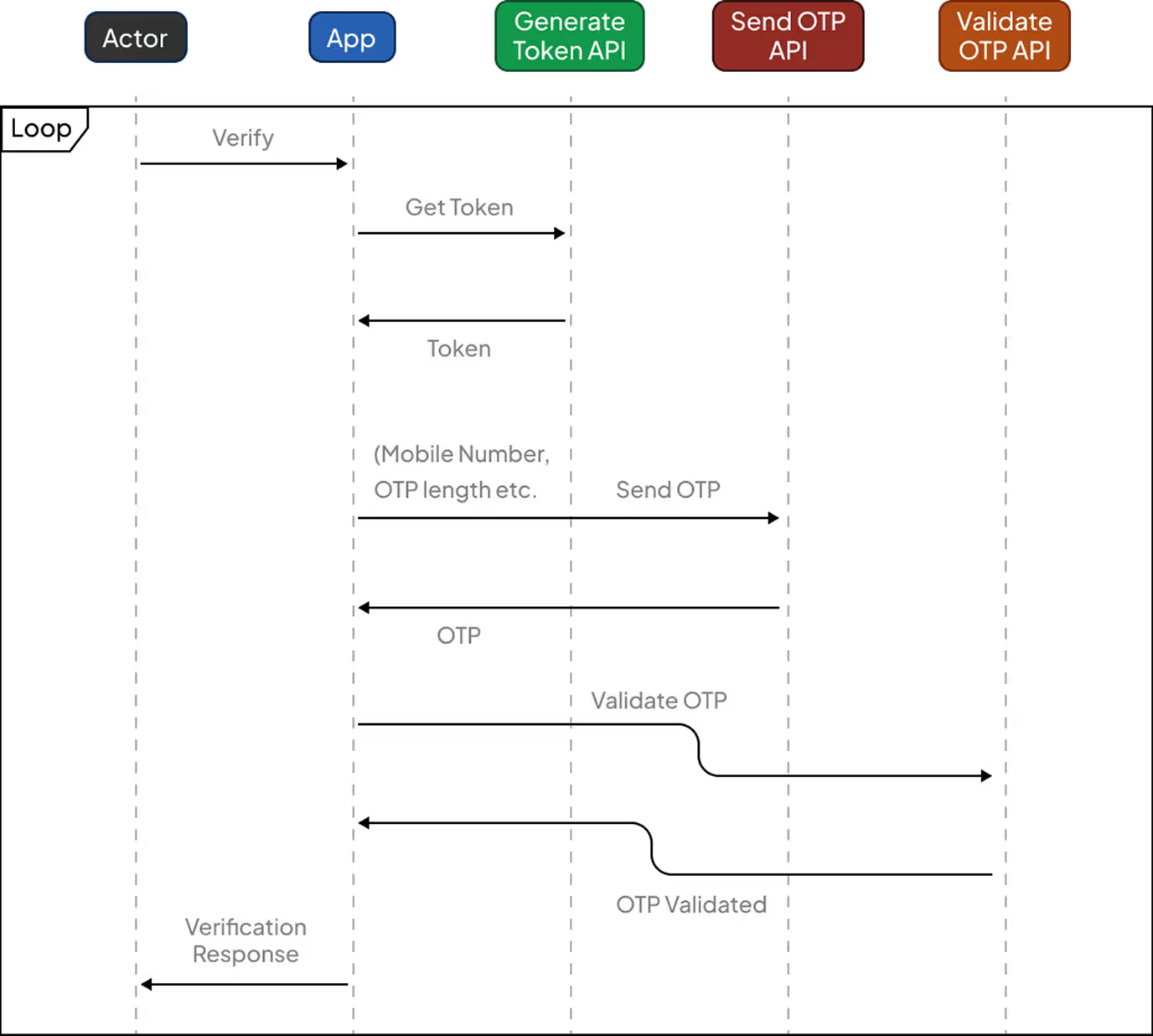
With VerifyNow, you can authenticate users by having the platform generate and send OTPs directly to them, streamlining your verification process.
OTP Generation and Delivery
When you trigger OTP delivery through VerifyNow, the platform handles OTP generation and sends the message using its built-in sender ID and template. You can'tset your own sender ID or customize the message template—these settings are fixed by the service.
Message Template Parameters
The following parameters are required when using VerifyNow APIs:
The enterprise application integrates OTP verification into its authentication workflow, ensuring secure and reliable user authentication. This approach delivers a consistent OTP experience for users across all supported regions.
Verification Flow
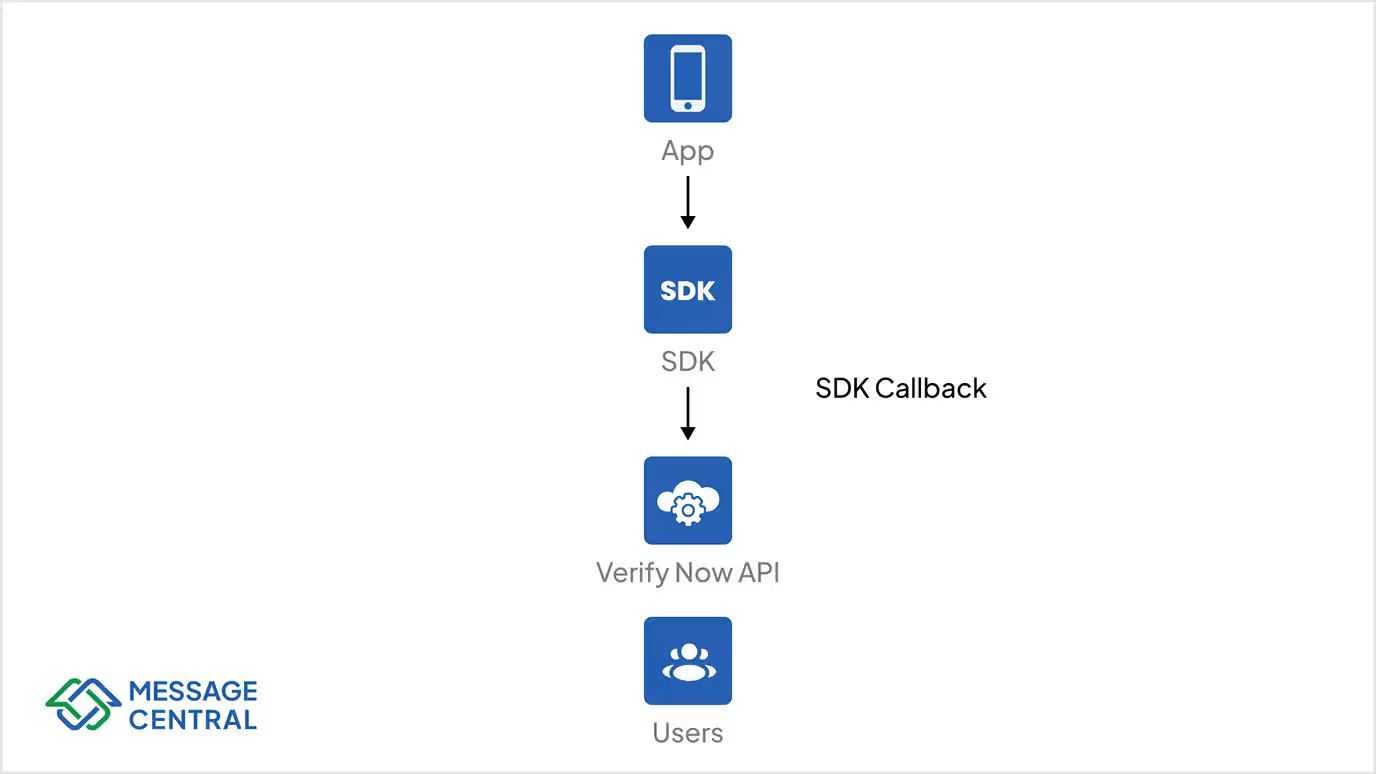
General workflow when integrating the VerifyNow SDK on iOS, Android, or JavaScript:
- Initiate Verification: Invoke the SDK method with the user’s phone number and preferred verification channel (SMS or WhatsApp) to start the process
- OTP Delivery: The VerifyNow service automatically sends an OTP using the selected channel, utilizing only system-approved sender IDs and templates.
- OTP Entry: The user inputs the received OTP within your application
- Verification Check: The SDK communicates with VerifyNow’s service to validate the entered OTP
- Success / Failure Response: Your application receives the validation result and can proceed with user login, account registration, or access control accordingly
Why Use VerifyNow
Before sending any SMS or WhatsApp message internationally, businesses must obtain sender ID and approvals from telecom regulators, a process that can take weeks.
VerifyNow eliminates this step by providing pre-approved sender IDs and templates across 200+ countries, allowing partners to integrate and go live instantly.
With VerifyNow, a single integration opens your app to a global audience while ensuring compliance and reliability.
Fallback Mechanism
VerifyNow includes a WhatsApp Fallback feature to ensure OTP delivery. If the primary channel (e.g., SMS) fails, VerifyNow automatically retries using an alternate channel (e.g., WhatsApp).
Currently supported fallback channels:
- SMS → WhatsApp
- WhatsApp → (Planned for future release)
Additional delivery methods are part of the roadmap; contact your Account Manager for updates.
Benefits of SDK Integration (vs API)
Summary
Using the VerifyNow SDK provides:
- Faster development and integration time
- Built-in verification flow management
- Automatic fallback and error handling
- Future-proof authentication methods
Next Steps
To integrate using SDKs, see:
- VerifyNow Android SDK Guide – Learn how to integrate the VerifyNowSDK-release-1.0.0.aar file, initialize the SDK, and perform mobile number verification on Android.
- VerifyNow iOS SDK Guide – Follow steps to add the VerifyNowSDK-release-1.0.0.xcframework and verify users via the iOS SDK.
If you already have a Message Central account, retrieve your credentials from the console. For enterprise onboarding or custom integration support, contact your Message Central account manager.
Integration Steps
Prerequisites for Integration
Before integrating the SDK, ensure you have an active account on Message Central. Messagecentral console
You’ll need the following credentials:
- customerId: A unique identifier for your Message Central account. You can find this on the Message Central home console.
- authToken: Secure token for SDK API authentication; valid for 24 hours and can be renewed. Store securely and refresh via the provided API when it expires.
These credentials are required for initiating verification requests. You will receive them once your account is created and approved.
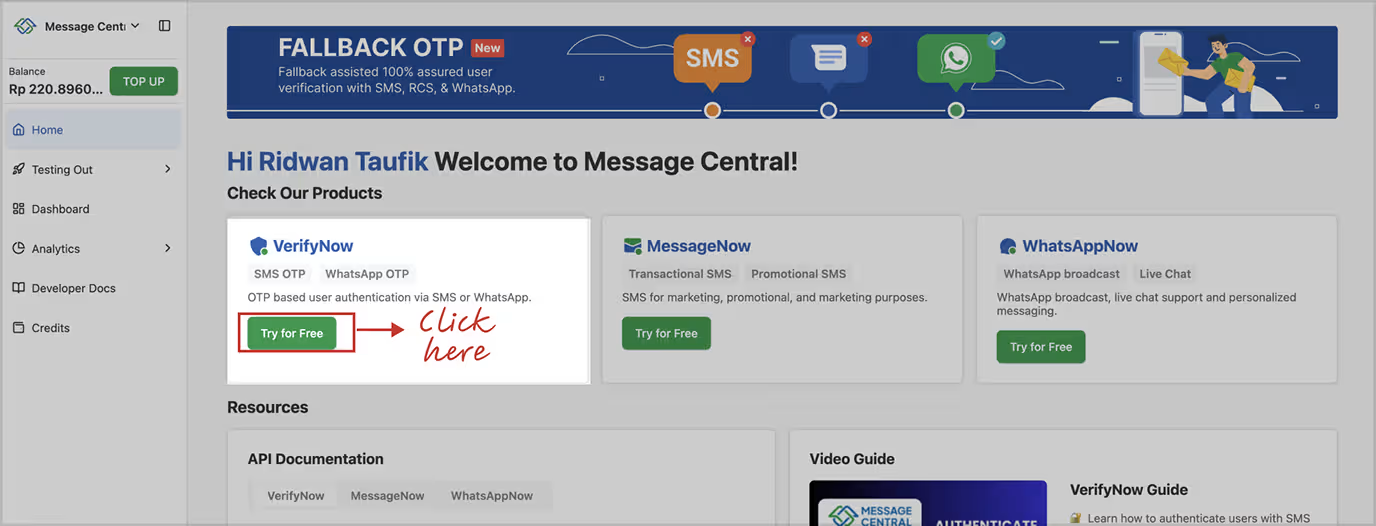
Get customerId or authToken
Login to Messagecentral console.
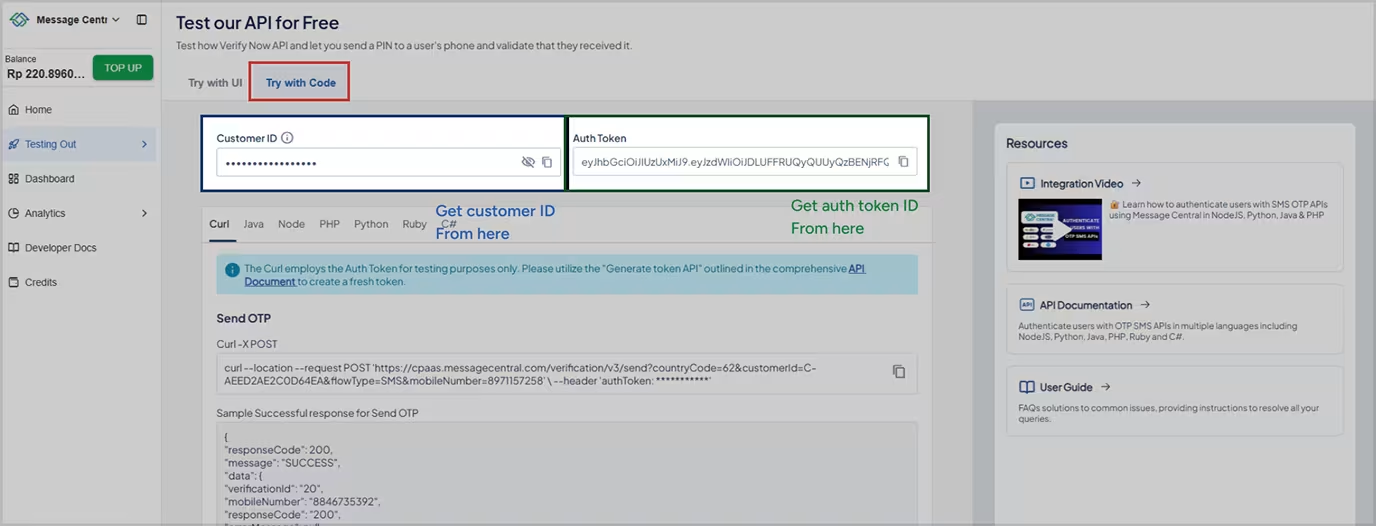
Or Generate authToken API
Before using the VerifyNow SDK to verify, you should have “authToken”. This API returns a token that must be included in all subsequent calls. An authentication token is needed to validate the user and should be included in the header section of each request.
Request Parameters:
Request URL Path:
1/auth/v1/authentication/token
cURL
1cURL curl --location 'https://cpaas.messagecentral.com/auth/v1/authentication/token?customerId=< CustomerId>&key=&scope=NEW&country=91&email=test@messagecentral.com' \ --header 'accept: */*'🚨 NOTE: To convert a cURL command into code using Postman, open Postman, import the cURL command via the "Import" button, and then generate the code in your preferred language by clicking the "Code" button on the right side of the request.
Response JSON
A successful response will return a 200 status code
1{
2       "status": Integer,
3       "token": "String"
4}
SDK Integration Android (Using .aar File)
- SDK Name: VerifyNowSDK
- File: VerifyNowSDK-release-1.0.0.aar
This guide walks you through integrating the VerifyNowSDK into your Android project using the local .aar file.
Android SDK – v1.0.0
- Release Type: Initial public release – February 2025
- Compatibility: Designed for Android platforms; minimum SDK version not explicitly mentioned but assumed to support standard Android 7.0+ (API 24+)
- Features:
- Core functionality for OTP verification via SMS and WhatsApp
- Callback structure defined
- ProGuard rules included for consumer-side integration
- Limitations:
- No sandbox/mock testing support
Step 1: Add the .aar File
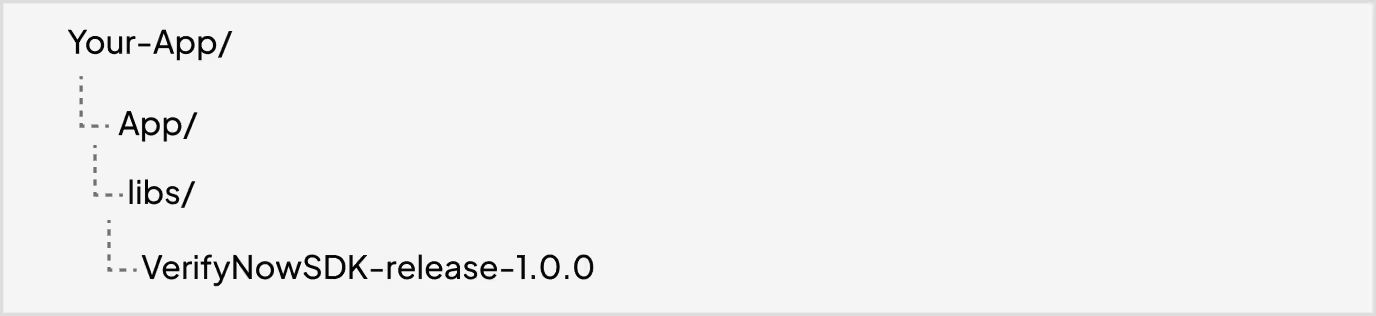
Copy the VerifyNowSDK-release-1.0.0.aar file into your app module's libs/ directory.
Project structure should look like:
Step 2: Add the AAR Dependency
Add this to your app’s build.gradle.kts dependencies:
dependencies {
 implementation("com.squareup.retrofit2:retrofit:2.11.0")
 implementation("com.squareup.retrofit2:converter-gson:2.11.0")
 implementation(files("libs/ VerifyNowSDK-release.aar"))
 }
Make sure the name matches the file name (without .aar extension)
Step 3: Initialize the SDK
After syncing the project and before using any verification features, ensure the SDK is properly initialized in your Application class or main activity.
Function Signature
VerifyNowSDK.init(
context: Context
)Step 4: Invoke and Use the SDK
Once initialized, you can begin the verification process using the available methods.
Function Signature
VerifyNowSDK.verify(
countryCode: String,
mobileNo: String,
customerId: String,
authToken: String,
isFallbackEnable: Boolean = false, // optional
callback: VerificationCallback )
Request Parameters:
This flag determines whether to use OTP fallback in case the primary verification fails.
- Set to true →The SDK will automatically switch to alternate OTP-based verification if Verify Now fails
- Set to false → No fallback is triggered; verification fails
Callback: VerificationCallback
You need to provide an implementation of VerificationCallback to handle the result of the verification.
object : VerificationCallback {
override fun success(success: VerificationSuccess)
{// Called when verification succeeds}override fun failure(error: VerificationError)
{// Called when verification fails}
}- success(success: VerificationSuccess): Invoked on successful verification. The VerificationSuccess may include a status(200), message and verified (true).
- failure(error: VerificationError): Invoked when verification fails. The VerificationError contains the errorMessage or errorCode.
import com.messagecentral.verifynow.VerificationCallback
import com.messagecentral.verifynow.VerifyNowSDK
import com.messagecentral.verifynow.network.VerificationError
import com.messagecentral.verifynow.network.VerificationSuccess
VerifyNowSDK.verify(
countryCode
mobileNo
customerId
authToken
isFallbackEnable
callback = object : VerificationCallback
override fun success(success: VerificationSuccess
Toast.makeText(this@MainActivity, "Verified: ${success .verified} message:
${success.message}
",
).show()
}
override fun failure(error: VerificationError) {
Toast.makeText(this@MainActivity, "Failed: ${error.errorMsg}",
).show
}
)SDK Integration IOS(Using .xcframework File)
- SDK Name: VerifyNowSDK-release-1.0.0.xcframework
- File: VerifyNowSDK-release-1.0.0.xcframework
This guide walks you through integrating the VerifyNowSDK into your IOS project using the local .xcframework file.
iOS SDK – v1.0.0
- Release Type: Initial public release – February 2025
- Compatibility:
- Supports iOS 16+
- Features:
- Core OTP verification functionality
- Unified callback structure (language syntax differs from Android)
- Limitations:
- No sandbox/mock testing support
Step 1: Add the VerifyNowSDK-release-1.0.0.xcframework Files
- In Xcode, open your app project or workspace
- Right-click on your project in the Project Navigator → select → “Add Files to [YourProjectName]...”
- Choose your .xcframework folder (e.g. VerifyNowSDK-release-1.0.0.xcframework).
- In the dialog:
- Check “Copy items if needed”
- Choose “Add to targets” → select your app target
Step 2: Link the Framework
- Select your project in Xcode → select your app target
- Go to the “General” tab
- Scroll to Frameworks, Libraries, and Embedded Content
- Click + → select your .xcframework
- Set the Embed option to “Embed & Sign” (important for device builds)
Step 3: Invoke and Use the SDK
Once initialized, you can begin the verification process using the available methods.
Function Signature
VerifyNowSDK.verify(
countryCode: String,
mobileNo: String,
customerId: String,
authToken: String,
isFallbackEnable: Bool = false,
completion: @escaping (VerificationResult<VerificationSuccess, VerificationError>)
)isFallbackEnable: Boolean = false
This flag determines whether to use OTP fallback in case the primary verification fails.
- Set to true → The SDK will automatically switch to OTP-based verification if Verify Now fails.
- Set to false → No fallback is triggered; verification fails if USSD is unsuccessful.
Callback: completionHandler
You need to provide an implementation of completion to handle the result of the verification.
switch result {
        case .success(let success):
             print("Verification result: \(success.status), message: \(success.message)")
        case .failure(let error):
             switch error {
                  case .verificationFailed(let errorCode, let errorMessage):
                      print("Verification failed - Code: \(errorCode), Message: \ (errorMessage)")
            }
           @unknown default:
               print("Unknown")
         }
success(success: VerificationSuccess): Invoked on successful verification. The VerificationSuccess may include a status(200), message and verified(true)message
public struct VerificationSuccess: Codable {
    public let status:Int
    public let verified: Bool
    public let message: String
}
failure(error: VerificationError): Invoked when verification fails. The VerificationError contains the errorCode and errorMessage.
public enum VerificationError: Error {
    case verificationFailed(errorCode: Int, errorMsg: String)
}
Example Usage:
VerifyNowSDK.verify(countryCode: countryCode,
                    mobileNo: mobileNo,
                    customerId: customerId,
                     authToken: authToken,
                     isFallbackEnable: isFallbackEnable) { result in
   switch result {
        case .success(let success):
                 print("Verification result: \(success.status), message: \(success.message)")
        case .failure(let error):
                 switch error {
                      case .verificationFailed(let errorCode, let errorMsg):
                            print("Verification failed - Code: \(errorCode), Message: \ (errorMsg)")
            }
           @unknown default:
               print("Unknown")
         }
🚨 NOTE:
- Ensure you have a valid authToken provided by MessageCentral.
- If isFallbackEnable is true, the SDK may use alternate methods like WhatsappOtp verification if primary method fails.
- Always handle both success and failure gracefully to improve UX.
SDK Capabilities
Error codes
Support
Contact email: support@messagecentral.com
Frequently Asked Questions
1. How can I send 2FA OTPs without registering my own 10DLC number in the USA?
You can use an OTP API like VerifyNow, which provides pre-approved 10DLC routes. That means you don’t need your own 10DLC registration or carrier approvals. You simply call the OTP API or OTP SDK and start sending 2FA OTP messages instantly.
2. What is the cost of sending 2FA OTP messages globally?
Pricing depends on your country and OTP channel (SMS or WhatsApp). VerifyNow offers transparent pay-as-you-go pricing, no monthly fees, and free test credits so developers can test OTP API/SDK delivery speed and success rates before spending anything.
3. Can I send both SMS OTP and WhatsApp OTP using one OTP API or SDK?
Yes. VerifyNow’s OTP API and OTP SDK support SMS OTP, WhatsApp OTP, and automatic fallback. You choose the channel or let the system switch automatically if the primary OTP channel fails.
4. Do I need to register sender IDs or templates in each country before sending OTPs?
No. With VerifyNow, all sender IDs and OTP templates are pre-approved across 190+ countries. You can launch global 2FA without waiting for local telecom approvals, which normally take weeks.
5. How quickly can I integrate a 2FA OTP flow using the VerifyNow OTP SDK?
Most teams integrate the OTP SDK in under 10 minutes. The SDK manages OTP generation, sending, validation, fallback, retries, and error-handling automatically—saving developers from writing backend logic.
6. How do I avoid SMS OTP delivery issues like carrier filtering or route failures?
Use an OTP verification platform with operator-approved routes. VerifyNow uses registered sender IDs, high-quality routes, and compliance-ready OTP templates, ensuring reliable delivery even in strict markets like USA, India, and UAE.
7. Can I use VerifyNow’s OTP API for 2FA authentication flows?
Yes. VerifyNow supports 2FA OTP, signup verification, password reset OTPs, device verification, transactional OTPs, and multi-factor flows across mobile and web apps.
8. What fallback options does the VerifyNow OTP API offer?
VerifyNow includes automatic fallback: SMS OTP → WhatsApp OTP fallback (if SMS fails). This increases the OTP conversion rate and reduces drop-offs in strict or low-coverage regions.
9. Do I need telecom approvals or local registrations to send SMS OTP internationally?
No. VerifyNow eliminates all telecom compliance hassles by providing:
10. How secure is the VerifyNow OTP API for 2FA authentication?
VerifyNow uses secure, time-limited OTP codes, encrypted API calls, fixed-approved OTP templates, fraud detection, retry limits, and channel fallback, ensuring strong 2FA OTP security for users across all regions.