Key Takeways
- The only safe way to send WhatsApp bulk messages without bans is through the official WhatsApp Business API. Manual tools, Chrome extensions, and “bulk sender” hacks will get your number flagged almost instantly.
- You cannot message users who haven’t opted in. WhatsApp requires clear user permission, or your templates will get rejected and your number may face restrictions.
- WhatsApp’s pricing changed in 2025 to a per-template model. Every template message is billed individually based on template type and user country, making bulk campaigns more predictable and easier to plan.
- Bulk messaging is only scalable with automation, templates, and personalization. To reach thousands safely, you need approved templates, contact uploads, and a marketing platform that handles compliance and delivery.
- A WhatsApp marketing platform (like WhatsAppNow) is the fastest way to get started. You get onboarding, analytics, template tools, automation, and API access without building your own infrastructure or managing Meta’s technical setup.
If you’re looking to send bulk messages on WhatsApp, you’re not alone. With more than 2.7 billion active users, WhatsApp has become the fastest way for businesses to reach customers where they already are. But to scale messaging safely, you need the right setup.
Most businesses simply want three things:
- Send messages to many customers at once
- Stay compliant and avoid bans
- Automate messaging with speed and personalization
This guide answers the most common questions businesses have about getting started with WhatsApp bulk messaging. Let’s get started!
What “Bulk Messaging on WhatsApp” Really Means Today
Bulk messaging isn’t just blasting text to thousands of users. It can mean many things depending on the tool you use:
1. Manual messaging
Sending texts one by one. Too slow for any real business case.
2. Broadcast Lists (WhatsApp Business App)
Lets you send a message to multiple contacts but only if they saved your number. No automation. No personalization. No reporting.
Not suitable for marketing, transactional alerts, or scale.
3. WhatsApp Business API (the safe, scalable method)
This is what real businesses use to send bulk messages without bans. It lets you:
- Send thousands of messages safely
- Use Meta-approved templates
- Personalize each message
- Automate journeys
- Integrate with CRMs, chatbots, APIs, or support systems
Older “bulk sender tools” or Chrome extensions will get your number banned instantly. Only WhatsApp Business API is approved for official marketing and bulk campaigns.
Also read: WhatsApp Templates- Categories and How to Register
Can You Integrate With the WhatsApp Business API Directly?
A lot of businesses wonder if they can skip the middle platforms and plug directly into the WhatsApp Business API. The answer is yes, but it comes with a catch: it’s not as simple as it sounds.
To integrate directly, you need to verify your Facebook Business Manager with official documents, set up your own backend or use Meta’s Cloud API, manage webhooks, handle template approvals, and stay on top of compliance rules yourself. You also don’t get any built-in dashboard, automation tools, or analytics, so your team has to build everything from scratch.
That’s why most companies choose platforms such as WhatsAppNow that come with all these features in-built. It handles the heavy lifting like onboarding, approvals, hosting, analytics, templates, and automations, so you can start sending WhatsApp messages much faster without hiring developers or maintaining servers. Direct integration works only if you have strong engineering resources and want to manage the whole system yourself.
Also read: How to Integrate WhatsApp Business API Into Your Website
WhatsApp Bulk Message Sender: What It Really Means
A WhatsApp bulk message sender is simply a tool that helps businesses send high-volume messages through WhatsApp without manual effort.
It allows you to:
- Reach thousands or millions of customers in minute
- Deliver messages directly to users’ WhatsApp inboxes
- Automate communication workflows
- Send reminders, order updates, receipts, promotions, flash sale alerts, and more
It is also extremely useful for internal communication, where companies notify employees at scale about:
- Policy changes
- Emergencies
- HR updates
- Shift reminders
- Announcements
A reliable WhatsApp bulk sender such as WhatsAppNow ensures high delivery rates, fast throughput, and no account bans when powered by the official WhatsApp Business API.
How to Send Bulk Messages on WhatsApp Using a WhatsApp Marketing Platform (WhatsAppNow)
If you want an easy way to send WhatsApp broadcasts without dealing with Meta’s technical setup, a WhatsApp marketing platform simplifies everything.
Here’s how to use WhatsAppNow:
Step 1: Create an account by signing up for free
Sign up on Message Central for free.
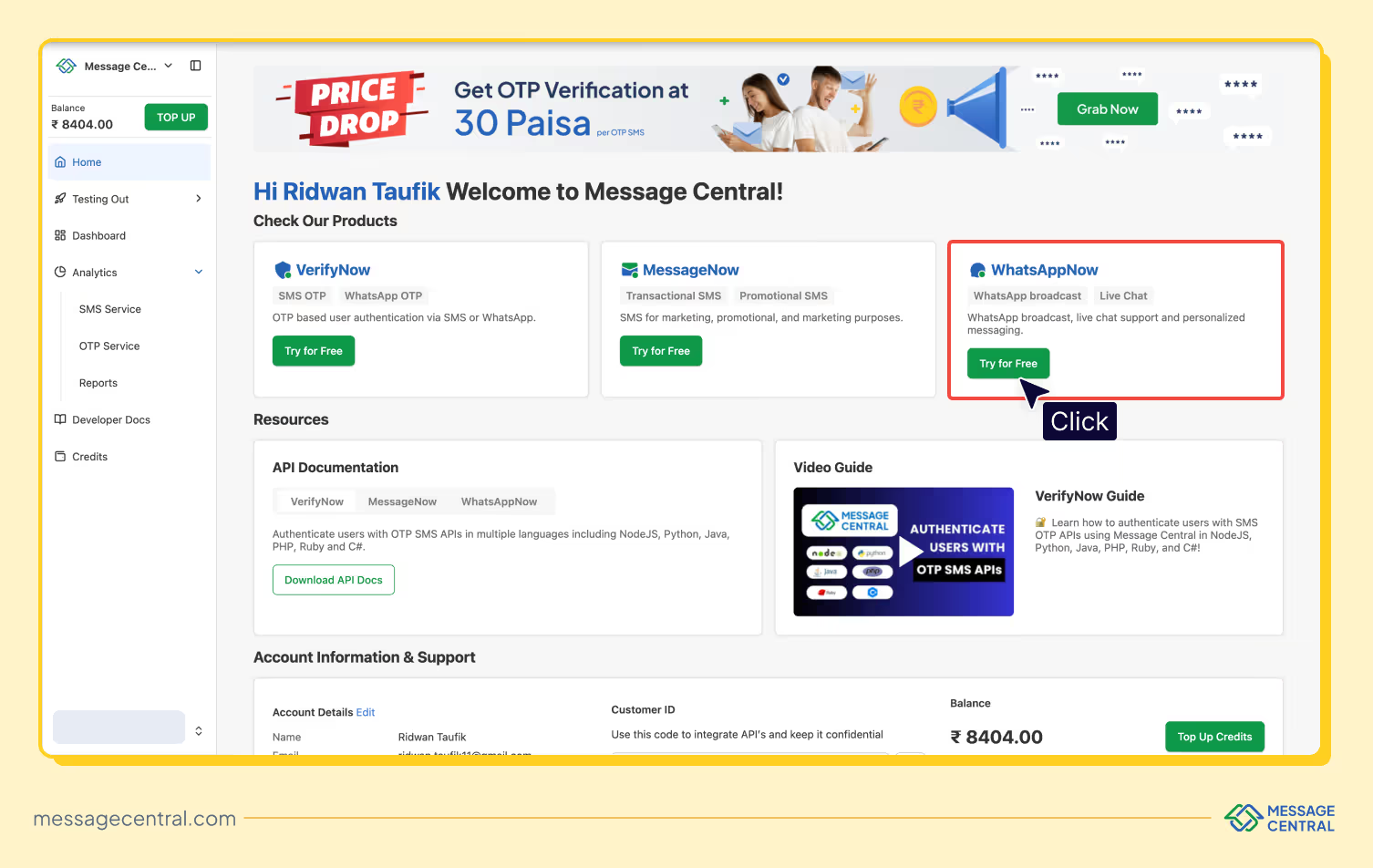
Step 2: Navigate to “WhatsAppNow” from the dashboard
Once inside the platform, you can navigate to WhatsAppNow as shown in the image below:
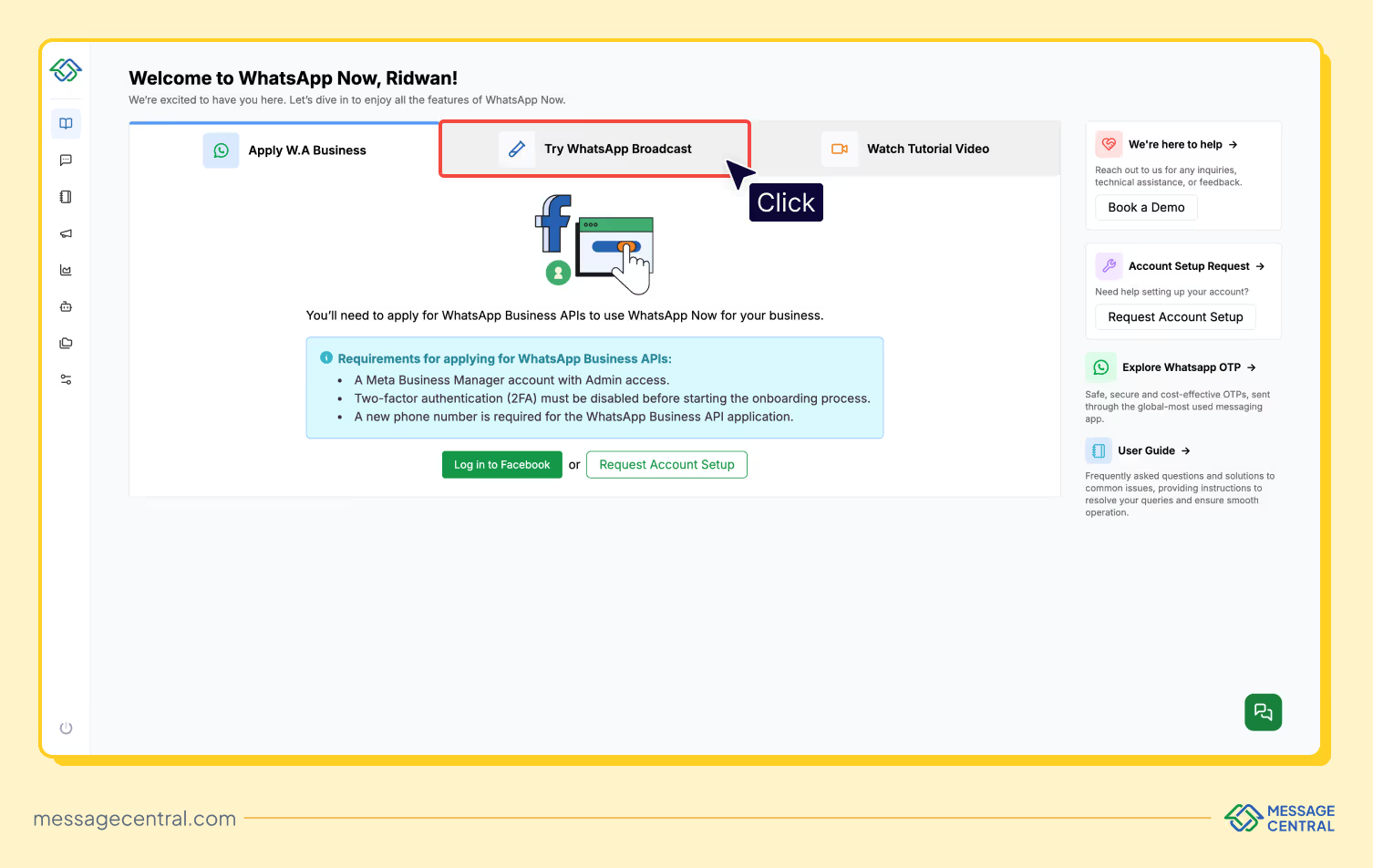
Step 3: Login to WhatsApp Business Account
You can then login into your WhatsApp business account from within the platform as shown. You can also send a WhatsApp broadcast message to test our services.
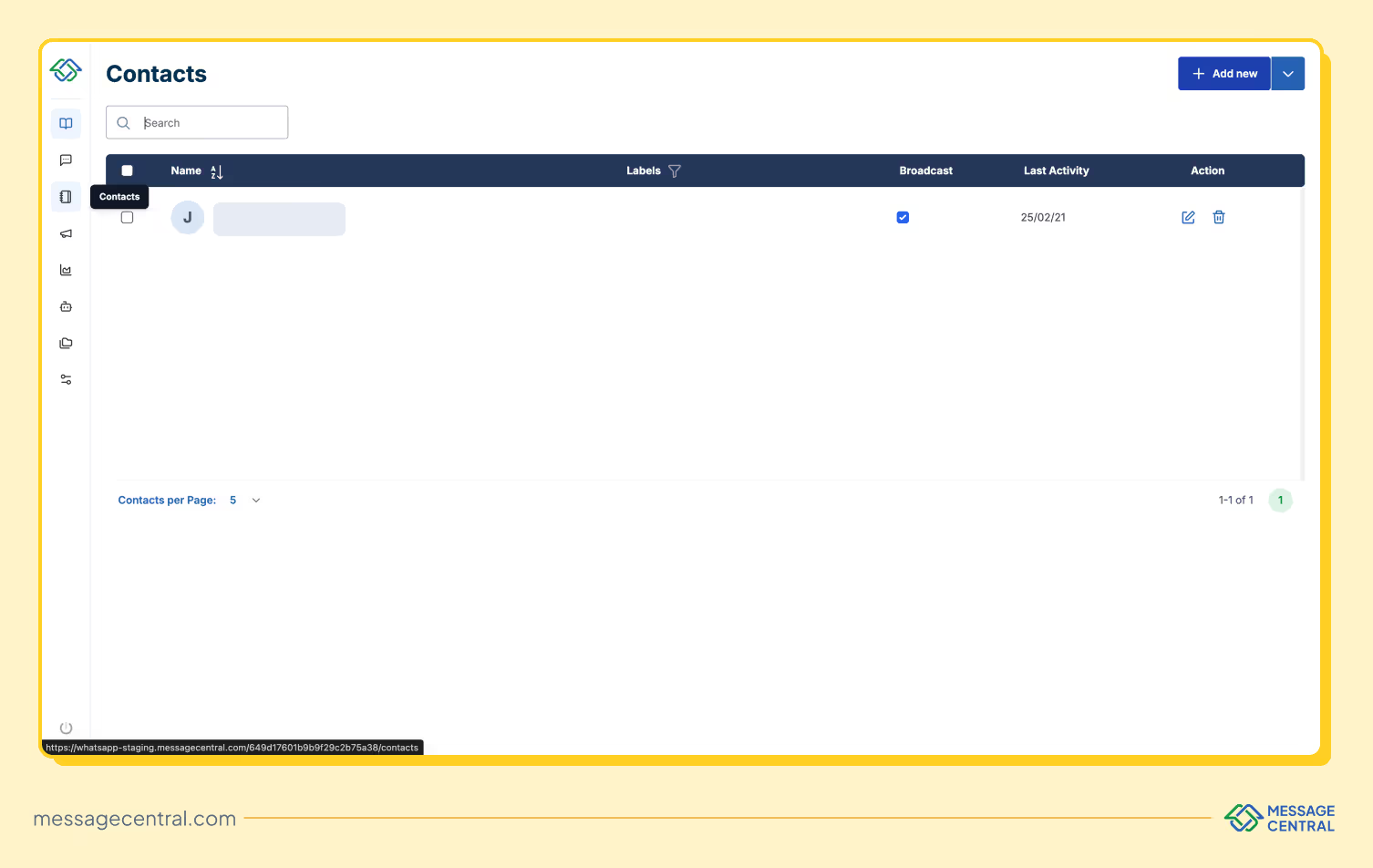
Step 4: Import your contact list
Once done, you can head to “Contacts” from the left panel and import the list of your contacts which you need to broadcast to. Navigate to “Campaign” from the left panel and create a new broadcast as shown below:
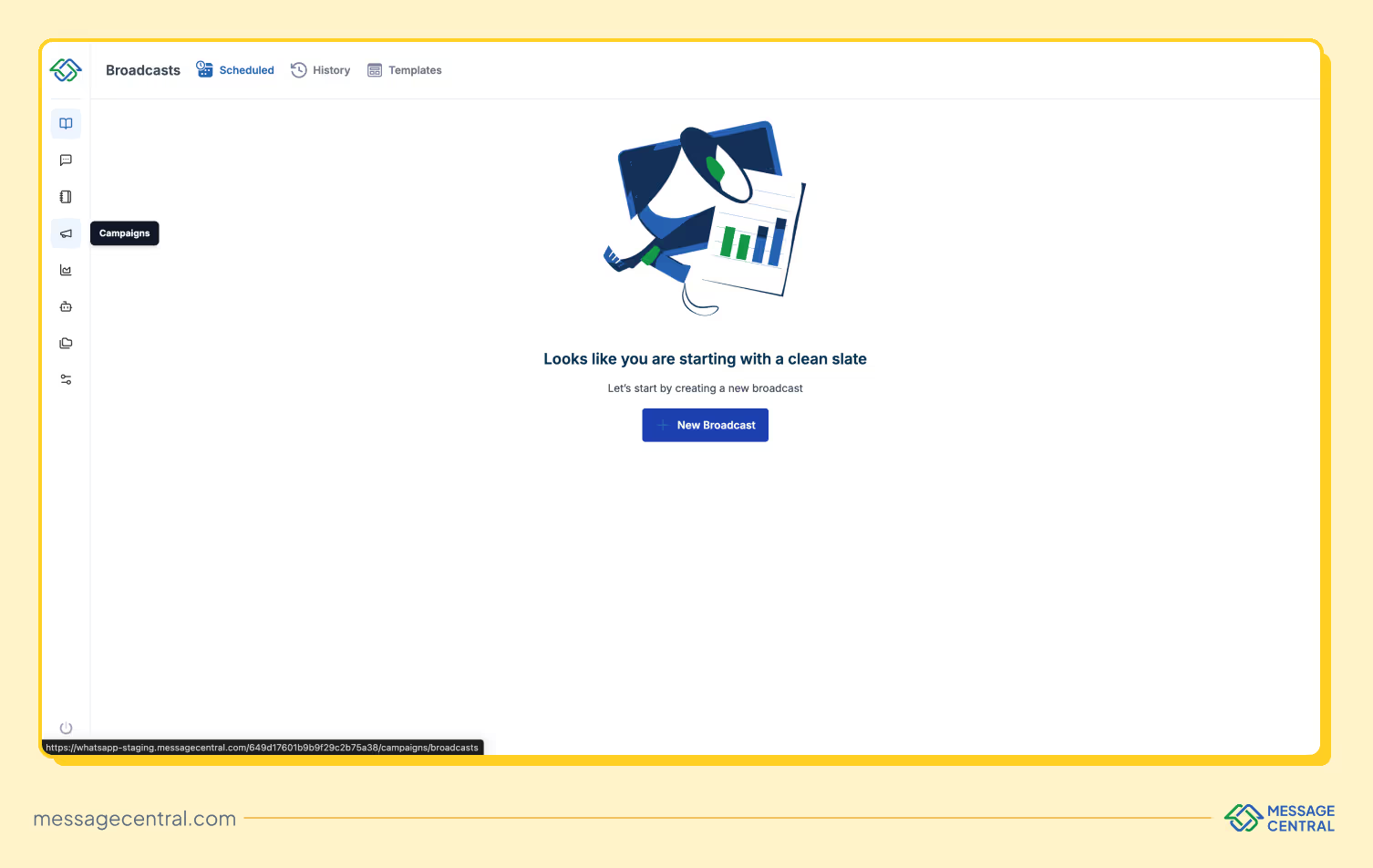
This workflow makes it easy for any team, technical or non-technical, to send WhatsApp broadcasts safely and instantly.
P.S.: Checkout our complete developer guide on WhatsAppNow API here.
WhatsApp Bulk Messaging Costs
If you’ve looked up WhatsApp pricing before, you might’ve noticed one thing: it’s confusing. Meta changed the pricing model, and a lot of blogs (and platforms) still show outdated information.
As of 2025, WhatsApp has moved away from its old conversation-based pricing model and now charges businesses per template message. In simple terms, every time you send an approved WhatsApp template to a user, that message is billed individually. No more paying for 24-hour conversation windows; you now pay per template, per user.
Pricing still depends on three things:
- The type of template you’re sending (Marketing, Utility, or Authentication)
- The country your user is in
- Your monthly volume, which can unlock better discounts
Even though the 24-hour service window still exists for user-initiated chats, messages you send inside that window now also count toward your bill. So if your team replies using a template, even during an active conversation, it still gets charged.
What this means for bulk messaging
Since broadcasts use Marketing templates, each message in your bulk send is billed separately. This new model makes costs more predictable and gives businesses more control. If you’re smart about your messaging strategy (like using Utility templates during active user sessions or batching promotional sends) you can keep costs low without sacrificing reach.
The bottom line
WhatsApp’s new pricing encourages businesses to be more intentional with bulk sends. Plan your campaigns, choose the right template type, and monitor message performance so you get the best mix of cost efficiency and engagement.
Final Thoughts
WhatsApp is one of the most powerful communication channels available, and using bulk messaging correctly can significantly improve customer engagement, marketing results, and operational efficiency.
The key to success is simple:
- Follow Meta guidelines
- Personalize your campaigns
- Use a reliable WhatsApp marketing platform like WhatsAppNow
- Avoid unofficial tools that cause bans
With the right setup, you can scale WhatsApp communication safely, quickly, and cost-effectively.
FAQs
Q) Can I send WhatsApp bulk messages to users who haven’t opted in yet?
A) Short answer: No. WhatsApp requires explicit user opt-in before you send any business-initiated message, especially bulk or promotional ones. Opt-in can be collected through your website, app, SMS, IVR, QR codes, or even in-store—but users must clearly agree to receive messages from you. Sending bulk messages without opt-in can quickly lead to template rejections, poor quality rating, or a banned number.
Q) What is the difference between WhatsApp Cloud API and WhatsApp On-Premise API?
A) The WhatsApp Cloud API and WhatsApp On-Premise API mainly differ in how they are hosted and how much technical work they require. The Cloud API is hosted directly on Meta’s servers, so it’s the fastest to set up and does not require any maintenance, servers, or ongoing updates. It scales automatically and is suitable for businesses of all sizes. The On-Premise API, on the other hand, is hosted on your own servers and needs IT support, DevOps resources, and regular maintenance. It takes longer to set up and costs more to operate, which is why it’s usually chosen only by large enterprises with strict data-control or compliance requirements. In short, the Cloud API is easier, faster, and cheaper, while the On-Premise API is meant for companies that want full control over their data and infrastructure.
Q) What is the difference between WhatsApp Business App and WhatsApp Business API?
A) The main difference between the WhatsApp Business App and WhatsApp Business API is the scale they are designed for. The WhatsApp Business App is made for small businesses that manage conversations manually. It allows simple messaging, limited broadcasts, and can only be used on one phone with a few linked devices. It does not support automation or large-scale messaging. The WhatsApp Business API, however, is built for growing businesses and enterprises that need automation, bulk messaging, approved templates, CRM integrations, multi-agent support, and advanced workflows. It can handle high message volumes and integrates easily with backend systems. Platforms like WhatsAppNow make using the API much simpler by offering ready-made dashboards, analytics, template management, and automation features so you don’t have to build everything yourself.