


Key Takeways
- WhatsApp OTP login lets users authenticate via a one-time password sent to their WhatsApp instead of SMS. Higher open rates (98% vs 95%), lower cost (~$0.00422 in US via WhatsApp OTP API vs $0.0075-$0.015 for SMS), branded sender with green verification tick, TCPA-exempt in US, and SIM-swap resistant.
- Meta's April 2025 US marketing template pause does NOT affect WhatsApp Authentication templates. WhatsApp OTP works normally in the US, India, UAE, Brazil, Indonesia, Mexico, and every other major market.
- Implementation is a standard three-endpoint pattern: send (POST with phone number, returns transaction ID), verify (POST with transaction ID + code, returns success/failure), and status (optional). Basic integration takes 1-3 engineering hours with SDKs available in Node.js, Python, Java, Go, PHP, Ruby, .NET.
- Multi-channel architecture is the winning pattern: WhatsApp OTP primary with automatic SMS OTP fallback pushes authentication completion from 92-95% (single-channel) up to 99%+. Add voice OTP as tertiary fallback for accessibility and blind-spot users. See SMS OTP Verification Service for the SMS layer.
- Best practices: 4-6 digit OTPs for consumer apps (6-8 for banking), 3-5 minute expiry, rate limiting (3 sends per phone per 5 min, 5 verify attempts per transaction), pre-flight phone verification via Phone Number Verification API to catch VoIP and disposable numbers before OTP send.
- Choose a Meta Business Partner provider with direct WhatsApp Business API access, multi-channel support, per-country compliance (A2P 10DLC, DLT, TDRA), transparent pricing in local currency, and 99.9%+ uptime SLA. Compare providers at Best OTP Service Provider USA.
According to Statista, WhatsApp has over 2.7 billion active users as of 2026 and is being used by 85 percent of internet users in India. That scale, combined with three important 2025 platform changes, has moved WhatsApp OTP login from novelty to mainstream authentication choice for businesses that want higher engagement and lower cost per verification.
With the maturity of WhatsApp OTP across every major market, WhatsApp is giving serious competition to OTP SMS verification, which remains the most popular use case of A2P messaging worldwide. Critically, when Meta paused WhatsApp marketing templates for phone numbers on major American carriers in April 2025 (see WhatsApp Marketing USA 2026), the Authentication category — which powers WhatsApp OTP — was completely unaffected. WhatsApp OTP works normally in the US, India, UAE, Brazil, Indonesia, Mexico, and every other market.
Here is why WhatsApp OTP login makes sense in 2026:
- Indian internet users basically live inside WhatsApp — conversations, orders, payments, reminders, and now authentication.
- Globally, WhatsApp has become the standard of business communication with WhatsApp OTP delivering open rates around 98 percent versus SMS at 95 percent.
- WhatsApp login makes the entire user experience seamless — the OTP arrives in an app the user checks 30 to 50 times a day.
- WhatsApp OTP login reduces spam because businesses are verified through Facebook Business Manager and can display the WhatsApp green verification tick to signal legitimacy.
- WhatsApp OTP is TCPA-exempt in the US market because it traverses TLS-secured IP rather than the PSTN, eliminating the $500 to $1,500 per non-consenting message class-action exposure that SMS OTP carries.
- WhatsApp OTP is SIM-swap resistant because WhatsApp accounts are device-bound and protected by a separate two-step PIN. A phone-number hijacker who swaps the victim's SIM cannot automatically read WhatsApp OTPs — a meaningful advantage over SMS OTP for high-value accounts.
What Is WhatsApp Login with OTP?
WhatsApp login allows users to authenticate and log in to your app or website using their WhatsApp account. This method simplifies the login process by eliminating the need for passwords, instead relying on a one-time passcode sent to the user's WhatsApp. The user receives the code in WhatsApp, enters it back into your application interface, and your backend verifies the code with the OTP service provider to complete authentication. Total end-to-end latency is typically 5 to 10 seconds on direct-carrier-connected providers.
WhatsApp OTP login is used across virtually every consumer-facing digital business in 2026: fintech (bank logins, transaction step-up), e-commerce (checkout, high-value purchase), SaaS (login MFA, admin verification), healthcare (patient portal access), ride-hailing (rider and driver verification), gaming (account signup, age verification), gig-economy platforms, and government-adjacent services. If your platform touches phone numbers in markets with high WhatsApp adoption (US at approximately 40 percent penetration with 55 percent among Hispanic-American segments per Pew Research, India at 95-plus percent, Brazil at 90-plus percent, UAE at 90-plus percent), WhatsApp OTP login should be part of your authentication stack.
How to Implement WhatsApp Login with OTP
Implementing WhatsApp OTP login involves setting up a WhatsApp Business API account, connecting to a Business Solution Provider (BSP), and handling the send-verify authentication flow. Here is the detailed guide.
Step 1: Set Up WhatsApp Business API Access
Apply for WhatsApp Business API access.
To use WhatsApp for authentication, you need a WhatsApp Business Account and access to the WhatsApp Business Platform through an official Meta Business Partner. Providers like Message Central handle Meta Business Verification, WhatsApp Business Account provisioning, and Authentication template pre-approval as part of onboarding, which typically shortens time-to-first-OTP from weeks to days.
Create a WhatsApp Business Account (WABA).
Once your Meta Business Verification completes, create a WhatsApp Business Account and set up your sender phone number with your verified brand name, profile picture, business category, and website URL. Verify that display name matches your registered legal name — mismatch is a leading Quality Rating hit.
Apply for the WhatsApp green verification tick.
Green-tick verified sender brands typically see 8 to 15 percentage points of additional conversion lift on WhatsApp OTP versus non-verified senders, per Meta internal data. See our guide on how to get a WhatsApp green tick.
Configure webhooks.
Configure webhooks so your application can receive delivery-status callbacks and (optionally) inbound message events. This setup allows your backend to log delivery metrics and route responses.
Step 2: Integrate the WhatsApp OTP API with Your Application
Call the send endpoint to generate and dispatch the OTP.
When a user attempts to log in, your application calls the OTP API send endpoint with the customer's phone number in E.164 format, an optional OTP length (typically 4 to 6 digits for consumer apps), and an optional expiry window (typically 3 to 5 minutes). The OTP API generates a cryptographically random unique code, dispatches it via WhatsApp Authentication template, and returns a transaction ID.
Illustrative REST call:
POST /verification/v3/send
{"mobileNumber": "+14155550100", "flowType": "WHATSAPP", "otpLength": 6, "expiry": 300}
Returns:
{"responseCode": 200, "data": {"verificationId": "txn_abc123xyz", "status": "MESSAGE_SENT"}}
Verify the OTP.
The user receives the OTP on WhatsApp within 5 to 10 seconds and enters it into your login form. Your application calls the OTP API verify endpoint with the transaction ID and the code the user entered.
Illustrative REST call:
POST /verification/v3/validate
{"verificationId": "txn_abc123xyz", "code": "485912"}
Returns on success:
{"responseCode": 200, "data": {"verificationStatus": "VERIFICATION_COMPLETED"}}
Authenticate the user.
If the verify endpoint confirms the code is valid and unexpired, mark the phone number verified in your session state and complete the login flow. On failure, allow up to 3 retries before invalidating the transaction and requiring a fresh send.
Step 3: Implement the User Interface
Login page.
Design a login page where users can enter their WhatsApp number in E.164 format. Provide a country-code picker for international users. Validate the number format on the client side and reject obviously invalid inputs before calling the API.
OTP input screen.
Once the OTP is sent, prompt the user to enter the 6-digit code received on their WhatsApp. Display a countdown timer matching the OTP expiry window, a resend button with a 30 to 60 second cooldown, and a link to switch to SMS OTP or voice OTP fallback if the user does not receive the WhatsApp message.
Error handling.
Implement error handling to manage incorrect OTP entries (typically 3 attempts allowed before requiring a fresh send), expired OTPs, and rate-limit failures. Show clear error messages so the user understands what to do next.
Multi-Channel Architecture: WhatsApp OTP with SMS Fallback
The winning architecture pattern in 2026 is not WhatsApp OTP alone, but WhatsApp OTP as primary with automatic SMS OTP fallback. Not every user has WhatsApp installed, and not every WhatsApp message delivers on the first attempt. Multi-channel architecture pushes authentication completion from 92 to 95 percent (SMS-only or WhatsApp-only) up to 99 percent-plus.
The pattern: your app calls the OTP API's send endpoint with a preferred channel (WhatsApp) and a fallback channel (SMS). The provider attempts WhatsApp delivery first. If the message fails to deliver within 30 to 60 seconds (WhatsApp is not installed, the user's device is offline, or the delivery is filtered), the provider automatically retries via SMS. Your app does not need to handle the fallback logic — the OTP API does it for you. For accessibility and blind-spot users, add voice OTP as a tertiary fallback. See WhatsApp OTP vs SMS OTP for the detailed decision framework and SMS OTP Verification Service for the SMS layer.
WhatsApp OTP vs SMS OTP: 2026 Comparison
Cost Efficiency
WhatsApp OTP is materially more cost-effective than SMS OTP in most markets in 2026. In the US market, WhatsApp OTP through Message Central's WhatsApp OTP API runs approximately $0.00422 per delivered OTP all-in — a fraction of SMS OTP at $0.0075 to $0.015 per delivered message on A2P 10DLC routes. In India, WhatsApp Authentication template pricing typically runs 20 to 40 percent less than SMS OTP through DLT-registered headers. In markets with high WhatsApp adoption (Brazil, UAE, Indonesia, Mexico), the WhatsApp OTP cost advantage widens further. See WhatsApp OTP Pricing for the current pricing breakdown.
Delivery and Open Rates
WhatsApp OTP messages achieve approximately 98 percent open rates versus SMS OTP at 95 percent. WhatsApp OTP is less likely to be blocked by carriers (it does not ride on carrier infrastructure at all) and more likely to be read promptly because it arrives in an app the user actively uses. Direct-carrier-connected SMS OTP providers still achieve 95 to 99 percent delivery, but WhatsApp OTP sidesteps carrier filtering entirely.
Security and TCPA Exemption
Both channels provide strong OTP security, but WhatsApp OTP benefits from WhatsApp's end-to-end encryption AND from being TCPA-exempt in the US market. The TCPA (47 USC 227) governs SMS and voice on the PSTN and does not apply to WhatsApp because WhatsApp traverses TLS-secured IP. This eliminates the $500 to $1,500 per-message private-right-of-action class-action exposure that SMS OTP carries. For regulated fintech, healthcare, and B2B verticals, TCPA exemption is a material advantage. WhatsApp OTP is also SIM-swap resistant because WhatsApp accounts are device-bound and protected by a separate two-step PIN, so a phone-number hijacker cannot automatically read the OTP.
User Experience
WhatsApp OTP offers a more seamless user experience. Users are familiar with receiving messages on WhatsApp and find it convenient to use for authentication. The branded sender (with green verification tick where eligible) increases user trust versus an anonymous SMS from an unknown short code.
Best Practices for WhatsApp OTP Authentication
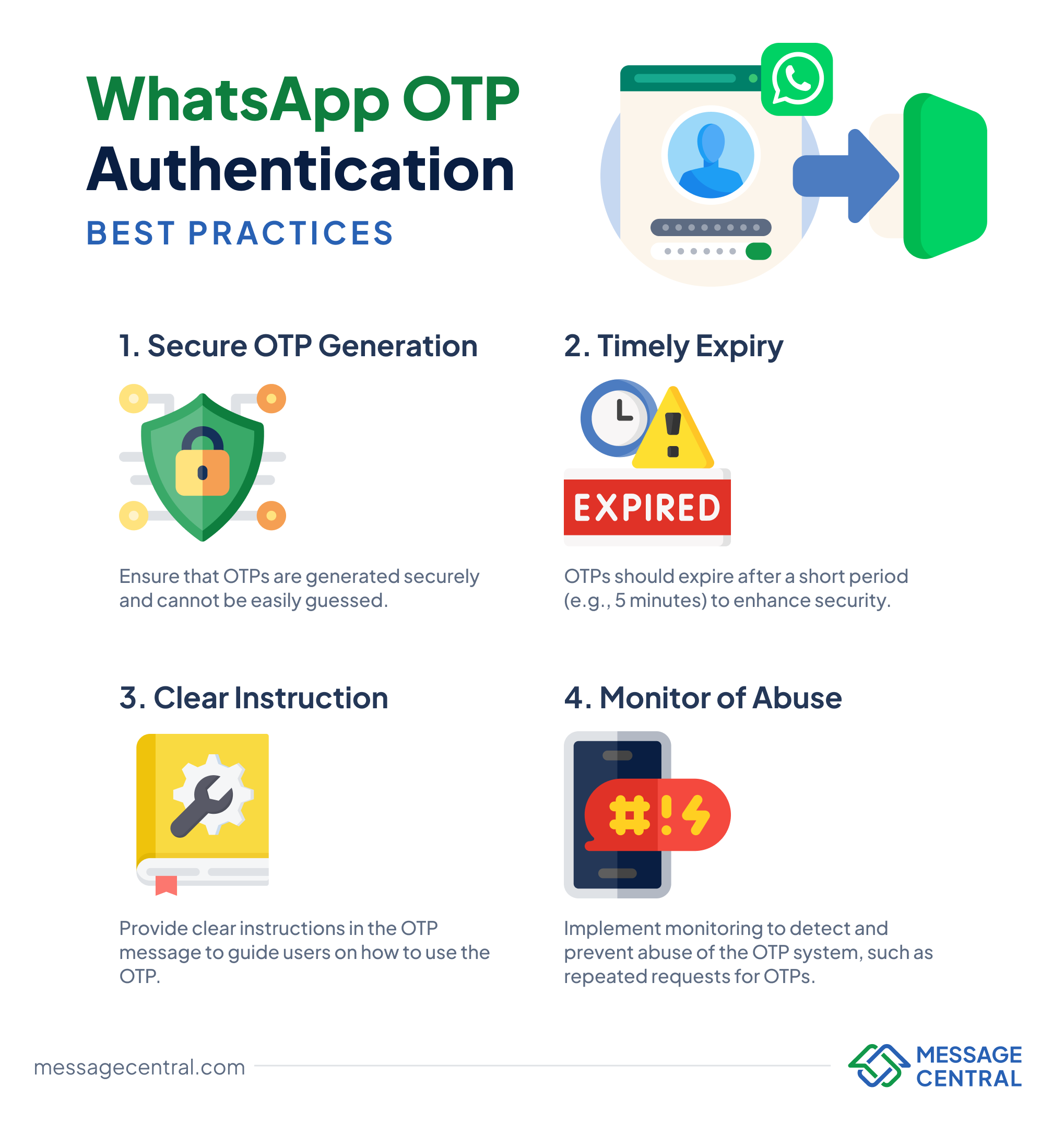
- Secure OTP generation. Ensure that OTPs are generated cryptographically randomly and cannot be easily guessed. Delegate this to your OTP API provider rather than rolling your own — a good OTP API generates codes with the correct entropy and handles collision avoidance for you.
- Appropriate OTP length. Use 4 to 6 digits for consumer authentication, 6 to 8 for banking and regulated fintech. Codes longer than 6 digits materially reduce completion rates on consumer apps because they feel like security theater.
- Timely expiry. OTPs should expire after 3 to 5 minutes for consumer authentication and 1 to 3 minutes for banking. Very short expiry windows (under 60 seconds) cause completion failures when users are briefly distracted; very long windows increase fraud risk.
- Clear instructions. The WhatsApp Authentication template should clearly state the code, note the expiry window, and warn against sharing the OTP. Use the recommended Meta template structure with a copy-code button for one-tap paste.
- Rate limiting to prevent abuse. Cap OTP send attempts to 3 per phone number per 5 minutes and verify attempts to 5 per transaction. Add per-IP rate limits to catch scripted abuse. Without rate limits, attackers can trigger OTP-flood attacks or SMS-pumping fraud on parallel channels.
- Pre-flight phone verification for high-value flows. Add a Phone Number Verification API pre-flight check that validates the number is real, active, and not VoIP or fraud-linked before you spend on the OTP send. Cheaper than eating the OTP cost on a fake signup.
- Monitor for abuse patterns. Log every send and verify call. Track resend rate, verify success rate, and failure patterns per country and per user cohort. Anomalous patterns (sudden spike in sends to a small phone-number range, sudden drop in verify rate) usually indicate fraud or abuse.
Choosing a WhatsApp OTP API Provider in 2026
Evaluate WhatsApp OTP API providers against these criteria before committing to volume:
- Meta Business Partner status and direct WhatsApp Business API access (not resellers).
- Multi-channel support — WhatsApp OTP with SMS OTP and voice OTP fallback through a single unified API.
- Direct carrier connectivity for the SMS fallback channel (95-99 percent delivery vs 80-90 percent for aggregators).
- Per-country compliance handling — A2P 10DLC for US, DLT for India, TDRA for UAE, and equivalent frameworks for every market.
- Transparent pricing in your billing currency (USD for US, INR for India, AED for UAE, BRL for Brazil).
- SDK quality in Node.js, Python, Java, Go, PHP, Ruby, .NET, Swift, Kotlin.
- 99.9 percent-plus uptime SLA with public status page.
- 24x7 support because authentication issues cannot wait for business hours.
For head-to-head OTP API provider comparison see Best OTP Service Provider USA 2026 and Best OTP SMS Provider in India. For the developer-focused WhatsApp OTP deep-dive see WhatsApp OTP API guide.
WhatsApp OTP Login with Message Central
Message Central operates VerifyNow as a global OTP service platform with direct WhatsApp Business API access as a Meta Business Partner. Multi-channel architecture (WhatsApp OTP primary with SMS OTP and voice OTP fallback) through a single API. Direct carrier connectivity in the US, India, UAE, Brazil, Nigeria, and 200-plus countries. A2P 10DLC handling for US SMS fallback, DLT for India, TDRA for UAE. Sub-10-second delivery latency on direct-carrier routing with 99.9 percent uptime SLA. REST API with SDKs in Node.js, Python, Java, Go, PHP, Ruby, .NET. Green-tick verification support for eligible brands. 24x7 timezone-aligned support across India, UAE, and USA business hours.
To start integrating WhatsApp OTP login into your web app or platform, sign up at the VerifyNow console for free trial credits — no credit card required — or explore the WhatsApp OTP API for USA, the WhatsApp Business API, or the VerifyNow OTP Verification product. Detailed API documentation at VerifyNow API. For the broader WhatsApp Business context see WhatsAppNow.
Frequently Asked Questions
What is WhatsApp OTP and how does WhatsApp login work?
WhatsApp OTP is a one-time password sent to a user's WhatsApp number to verify their identity for login, signup, transaction confirmation, or password reset. The user enters their WhatsApp-registered phone number on your app's login screen, your backend calls the WhatsApp OTP API's send endpoint, and the API generates and delivers the code via a WhatsApp Authentication template within 5-10 seconds. The user enters the code back in your app and your backend calls the verify endpoint to complete authentication. Basic integration takes 1-3 engineering hours.
Is WhatsApp OTP login secure?
Yes. WhatsApp OTP benefits from WhatsApp's end-to-end encryption between Meta and the recipient device. It is also SIM-swap resistant because WhatsApp accounts are device-bound and protected by a separate two-step PIN — a phone-number hijacker who swaps the victim's SIM does not automatically receive WhatsApp OTPs. In the US market, WhatsApp OTP is also TCPA-exempt because it traverses TLS-secured IP rather than the PSTN, eliminating $500-$1,500 per non-consenting message private-right-of-action exposure.
What are the advantages of WhatsApp OTP over SMS OTP?
WhatsApp OTP delivers approximately 98% open rate vs SMS OTP at 95%, costs 30-60% less per delivered OTP in most markets (approximately $0.00422 in the US via Message Central's WhatsApp OTP API), displays your business name with green verification tick instead of an anonymous short code, is TCPA-exempt in the US market (traverses TLS-secured IP not PSTN), and is SIM-swap resistant (WhatsApp accounts are device-bound with a separate two-step PIN). SMS OTP still wins on universal reach across every phone including feature phones. Most sophisticated setups use both — WhatsApp OTP primary, SMS OTP automatic fallback.
Does the Meta April 2025 marketing template pause affect WhatsApp OTP?
No. Meta paused the marketing category of WhatsApp templates for phone numbers on major American carriers in April 2025, but the Authentication category (which powers WhatsApp OTP) was completely unaffected. WhatsApp OTP works normally in the US, India, UAE, Brazil, Indonesia, Mexico, and every other major market. If anything, the marketing template pause has increased focus on WhatsApp Authentication as the reliable, always-available WhatsApp channel for US businesses.
How can a business start using WhatsApp OTP for authentication?
Sign up with a Meta Business Partner OTP API provider like VerifyNow, complete Meta Business Verification, set up your WhatsApp Business Account, get 1 to 3 Authentication templates pre-approved, integrate the OTP API send and verify endpoints into your application, and launch. Total time from signup to first production WhatsApp OTP is typically 5 to 10 business days for a clean enterprise setup. Basic API integration takes 1 to 3 engineering hours. See VerifyNow API documentation for code samples.
How long should a WhatsApp OTP be valid?
Consumer authentication OTPs should expire after 3 to 5 minutes, banking and regulated fintech OTPs after 1 to 3 minutes. Shorter windows improve fraud protection but hurt completion rates if users are briefly distracted; longer windows increase fraud exposure. Match the expiry to your risk profile and vertical.



.avif)